
Introduction
Let’s start with a statistic that’ll make you spit out your coffee: According to IDC, the average small company generates a staggering 1.7 MB of data every second. Digest that figure for a moment. It’s not just numbers on a spreadsheet—it’s a flood of documents, emails, presentations, client communications, and more, relentlessly piling up. Now, imagine you’re a freelancer or a small business owner. You’re on the brink of sealing a major contract that could propel your business to new heights. But when the moment comes to deliver the final proposal, you can’t access the file. A storage sync error has left you high and dry. The client, unimpressed and on a tight deadline, moves on to someone who can actually deliver. All your late nights and hard work go down the drain because your online storage solution failed you at the worst possible moment.
Here’s the reality: Online storage for business is often treated as an afterthought until it fails spectacularly. And when it does, the consequences can be catastrophic. This article will tackle why online storage shouldn’t be a neglected footnote in your business strategy. We’ll dive into how you can shift from bleeding money on expensive monthly storage rentals to owning your storage solutions outright. It’s time to rethink your approach to data management, reduce overhead, and tighten up data security.
Defining Online Storage for the Modern Business Owner
So, what exactly is “online storage for business”? It’s not just a fancy term for dumping your files somewhere you can access them later. It’s about so much more. Let’s break it down.
First, there’s simple file hosting. This is your basic Dropbox or Google Drive setup. Useful? Sure, until you hit that storage cap and start forking over more cash every month. Then there’s sync services, which are supposed to keep your files up-to-date across devices. Supposed to. The problem is, they often drop the ball at the worst times, like in our earlier scenario. Finally, you’ve got off-site backups. Think of these as your digital insurance policy, sitting quietly in the background until disaster strikes.
But here’s where most folks trip up—they see these as separate, standalone tools. That’s a mistake. Online storage should be the backbone of your remote collaboration efforts, the silent operator that makes sure your team is seamlessly connected, no matter where they are.
Let’s dig deeper. The shift from local hardware to the cloud isn’t just a trend—it’s a necessity. Remember the days of lugging external hard drives around and praying your laptop didn’t crash? It’s laughable now, right? Outdated local storage systems are prone to failure, theft, and all sorts of calamities. Plus, they’re a logistical nightmare. Cloud storage, on the other hand, offers flexibility and peace of mind. But be warned: not all cloud storage solutions are created equal.
The “online storage for business” model is about choosing a solution that integrates with your workflow, not complicates it. It’s about finding a system that acts like an operating system for your business, seamlessly integrating with your operations and enabling real-time collaboration. Consider it the digital foundation upon which your remote team stands. It’s the difference between your team working like a well-oiled machine or a dysfunctional group of siloed individuals.
As a modern business owner, you need storage solutions that can scale with you. You don’t want to be constantly upgrading plans or dealing with surprise overage charges. And let’s face it, data security should be a top priority. With data breaches making headlines every other day, can you really afford to skimp on security?
So, how do you move from renting to owning your storage solutions? Start by evaluating your current needs and future growth. Look for lifetime deals (LTDs) that offer flat fees for storage services. They’re out there if you know where to look. Services like pCloud and Icedrive offer one-time payment options that give you peace of mind without the monthly drain on your wallet.
In conclusion, treating online storage as an indispensable asset rather than a disposable utility is key to staying agile and competitive. It’s time to take control of your data, protect your business from unexpected failures, and ensure that your storage solutions are as robust and reliable as you are. Are you ready to stop treating your data like an afterthought and start leveraging it as a strategic advantage? It’s about time.
Critical Storage Terms You Must Know
Let’s be blunt: understanding storage isn’t just for tech geeks. It’s for anyone who doesn’t want their business to crash and burn. So, wake up and get familiar with these terms. They could be the difference between smooth sailing and a data disaster.
Zero-knowledge encryption is your first line of defense. It’s like a lockbox that even the storage provider can’t open. When your files are encrypted before they even leave your device, the provider has no key to decrypt them. This means that even if your provider’s servers are hacked, your data remains as mysterious as a locked diary. For businesses, this isn’t just technical mumbo-jumbo. It’s peace of mind. Imagine you’re storing sensitive client information or proprietary business plans. Without zero-knowledge encryption, you’re basically trusting a stranger with your deepest secrets. Are you really okay with that?
Next up, file versioning. Think of it as your digital safety net. Ever accidentally deleted a file or got hit by ransomware? With file versioning, you can roll back to previous versions of your files. It’s a backup of a backup. For businesses, this is crucial. Picture this: one of your employees accidentally deletes a crucial report, or worse, a ransomware attack encrypts your current files. Without file versioning, you’re screwed. But with it, you can restore your files to a previous state, like it never happened. This isn’t just about saving files; it’s about saving your business.
Then there’s cold vs. hot storage. Cold storage is like your attic; you store things you don’t need often. Hot storage is your desk drawer; it’s for everyday items. For businesses, knowing when to use each is key. If you have data that you rarely access, like old financial records, cold storage is cheaper and more practical. But for current projects and frequently accessed files, hot storage is your go-to. It’s about efficiency and cost-effectiveness. Don’t stuff everything in hot storage just because it’s convenient. That’s like keeping your snowboard in the living room all year round.
Finally, we have data residency. It’s not just about where your data sits but also about the legal implications. Different countries have different laws about data privacy and protection. For businesses, this means you need to know where your data is physically stored. If you’re in Europe, storing data in a server located in the U.S. could mean you’re violating GDPR. Ignorance here isn’t bliss; it’s a lawsuit waiting to happen. [Internal Link: Link to our article on business launch checklists]
The Hidden Costs of Mainstream Cloud Storage
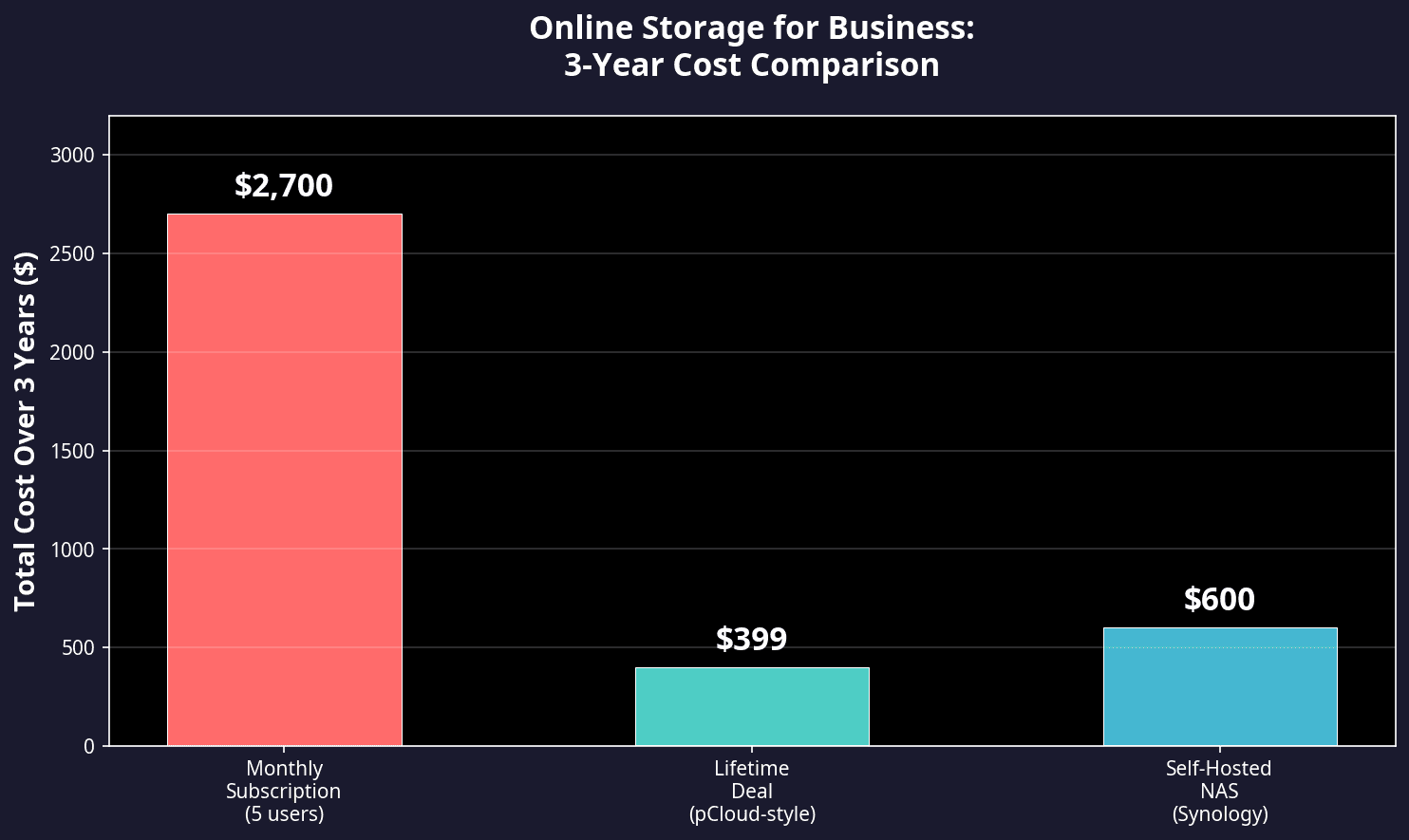
Here’s the reality: the “per-user, per-month” model is a financial trap. Let’s break it down. Say you have a small business with five employees. You sign up for a cloud service charging $15 per user each month. That’s $75 a month. Doesn’t sound too bad, right? But over three years, you’re shelling out $2,700. That’s just for storage. Compare this to a lifetime deal or a dedicated private server. A one-time payment for a server might be $1,500, and it’s yours forever, no strings attached. Those recurring costs eat into your margins like termites in wood. Budget-conscious founders need to stop, look, and rethink these “convenient” subscriptions.
These recurring costs create what I like to call “subscription fatigue.” As your business grows, so does your data. And guess what? Your storage costs won’t stay the same. They jump into higher tiers with little warning. It’s like suddenly realizing your gym membership costs double because you decided to work out more. For instance, Google used to have “unlimited” storage plans for their G Suite accounts. But in 2020, they announced limits on storage, forcing many businesses to upgrade their plans or risk running out of space. That’s a bait and switch, plain and simple. The plan you signed up for isn’t the plan you’re stuck with.
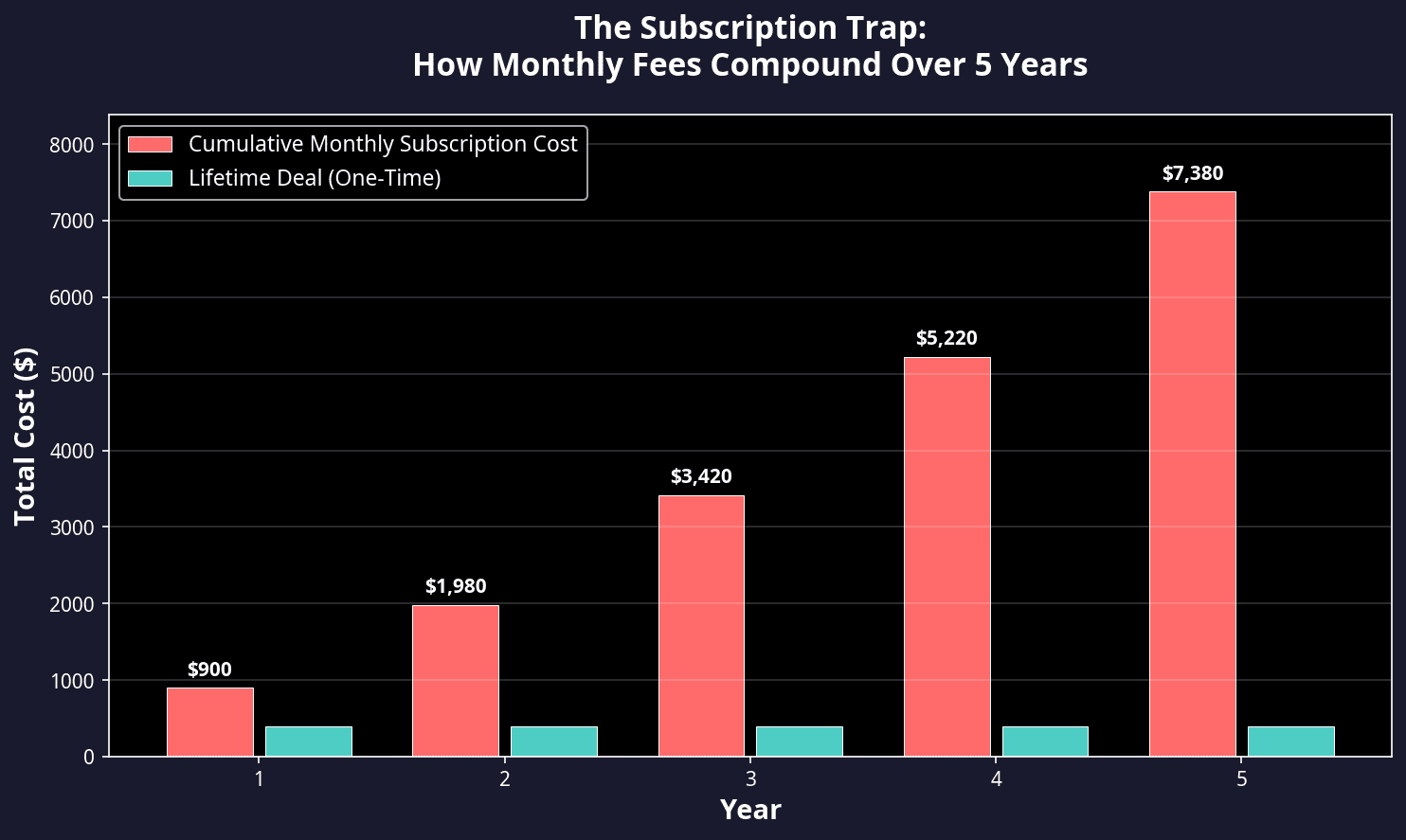
Your business isn’t static, and neither are these costs. As you add more files, the “per-user” model becomes a leech on your finances. The more your business grows, the more you’re paying for the same old service. It’s a vicious cycle that leaves you financially drained. So, what’s the solution? Look for lifetime deals, invest in a private server, or even consider hybrid models that combine on-premise storage with cloud capabilities. Stop being a slave to the monthly subscription. Take control of your data and your budget.
In this fast-paced business world, the last thing you need is another recurring expense eating away at your bottom line. Be smart, be strategic, and keep these hidden costs from sabotaging your success.
Assessing Your Real Storage Needs and Security Risks
Let’s cut through the noise: knowing your storage needs isn’t about buying the biggest hard drive or subscribing to the most expensive cloud service. It’s about clarity. Wake up and assess what you’re actually dealing with. You need to categorize your files into “Active Project Data” and “Archive Data.” Why? Because not all data is created equal.
Step 1: List All Current File Types
Start by taking stock of what you have. Open your file explorer or your cloud storage dashboard. List every type of file you see—videos, PDFs, high-res images, spreadsheets, and whatever else you find. This isn’t just busywork; it’s the foundation of understanding your storage needs. Are your video files eating up space like a teenager at a pizza buffet? Is your collection of high-res images bigger than your actual work? Know your enemy.
Step 2: Multiply Current Usage by a Projected Growth Rate
Once you’ve listed everything, it’s time to project. Take your current usage and multiply it by a reasonable growth rate. Let’s say 20% annually. Why 20%? Because that’s a conservative estimate for most businesses that plan to grow. So if you’re currently using 100GB, expect to need at least 120GB next year. Planning ahead isn’t just smart; it’s essential.
Step 3: Identify Files for Frequent External Sharing
Let’s get real. Not every file needs to be shared with external clients. Identify which files require frequent sharing. This step is crucial because it helps you decide which files need to be stored in a more accessible and secure environment. Client pitches, project updates, and collaborative documents? Keep them front and center. Old invoices and completed projects? Archive them.
Now, let’s talk security because using consumer-grade storage for business is, frankly, a rookie mistake. The risks are real—unauthorized access, data leaks during transit, and lack of administrative controls. You think a free Dropbox account is going to cut it? Think again. You need “online storage for business” with audit logs. These logs are your lifeline, letting you see who accessed what file and when. This isn’t just about peace of mind; it’s about maintaining control over your data.
[External Link: Find a study on the cost of data breaches for small businesses from a source like IBM or Ponemon Institute]
Alternatives to the Standard Subscription Model
Let’s be blunt: the subscription model is a leech on your wallet. It’s the payday lender of the software world—convenient but costly in the long run. Instead, consider lifetime software deals. These deals are your ticket out of the hamster wheel of monthly bills.
So, what’s the deal with lifetime software deals? They’re exactly what they sound like—one-time payments for perpetual access to software. For side hustlers and freelancers, this is gold. No more waking up to a surprise $50 deduction from your account. You pay once, and you’re done. It’s like buying a house instead of renting forever.
That’s where platforms like https://sidehustlereality.com come into play. This site is your compass in the chaotic sea of online tools. It helps you find and evaluate these lifetime storage deals. Here’s how it works: the platform filters through the marketing noise to spotlight tools with genuine ROI. No more sifting through endless product pages or getting suckered by flashy ads. The site provides reviews of secure cloud storage options that focus on privacy and long-term cost savings.
Using their guides, you can transition to a digital workflow that doesn’t require a massive monthly budget. Imagine the freedom of cutting out recurring expenses and still having access to top-tier tools. It’s not just about saving money; it’s about reclaiming control over your business tools.
[Internal Link: Link to our article on lifetime software deals]
In summary, assessing your real storage needs and understanding security risks helps you make informed decisions. Ditch the subscriptions and embrace lifetime deals. Your wallet—and your peace of mind—will thank you.
Self-Hosted Cloud Solutions
Let’s be blunt. If you’re running a business and still relying on third-party cloud solutions without considering self-hosted options, you’re not thinking long-term. Wake up. Investing in a Network Attached Storage (NAS) device can be a game-changer. Imagine having your own private cloud, tailored to your business needs, without the recurring costs. A NAS device allows you to control your data, ensuring privacy and customization that commercial providers can’t match.
Here’s how you set it up. First, buy the hardware. Brands like Synology or QNAP are solid choices. You’re looking at an upfront cost, sure—a few hundred to a couple of thousand dollars depending on your storage needs. But let’s do some math. Compare this to a five-year cloud subscription: you could spend the same amount in just a couple of years on a service like Dropbox or Google Drive. Do you really want to keep forking out cash indefinitely?
Next, install software like Nextcloud. It’s open-source and offers a suite of services, including file sync, calendar, and contact management. Installation is straightforward, and there are plenty of online tutorials to guide you through. Then, set up remote access. This step is crucial. Configure your NAS to allow employees to access files remotely while maintaining top-notch security. This isn’t just about saving money; it’s about taking control.
Comparing the Top Online Storage Providers
SideHustleReality.com
Here’s the reality: there’s no one-size-fits-all when it comes to online storage. That’s where Side Hustle Reality comes in. Instead of pushing a single provider, it serves as a portal to compare high-ROI tools. Whether it’s pCloud or Icedrive, they focus on lifetime access deals, a godsend for anyone tired of monthly fees. Their “Productivity tool reviews” are spot-on, helping you see which storage options integrate seamlessly with your existing business apps. Why waste time and money integrating systems that won’t play nice together?
Dropbox
Dropbox is the granddaddy of online storage. Its “Smart Sync” feature is a game-changer, allowing you to view all your files on your desktop without eating up hard drive space. But let’s not ignore the elephant in the room: costs for team plans are climbing. If you’re running a lean operation, those monthly bills can add up faster than you think. Are you really okay with that?
Google Drive
Google Drive shines with its collaboration features. Real-time editing in Docs and Sheets linked directly to storage is a boon for teams. But here’s the catch—privacy. If your business deals with sensitive IP, Google’s data policies might make you nervous. Are you willing to compromise your intellectual property for convenience?
IDrive
IDrive is less about sync and more about backup. Their “IDrive Express” service is intriguing—they ship you a physical drive to speed up those massive initial uploads. It’s a great solution if your business generates lots of data. Currently, IDrive offers team plans with 5TB or 10TB options, priced competitively. This makes it an attractive choice for data-heavy enterprises.
How to Choose Your Next Storage Solution
Choosing the right storage solution isn’t just about cost—it’s about features. Here’s a checklist to make sure you’re covering all bases:
- Does it offer end-to-end encryption? Security isn’t optional.
- Can I set granular permissions for different team members? Control who sees what.
- Is there a mobile app that allows for offline file access? Convenience counts.
- What is the specific recovery process if a device is lost or stolen? Be prepared for the worst.
[CTA: Visit Side Hustle Reality to see the latest comparisons of secure cloud storage solutions]
Conclusion
Sticking with a high-cost, low-security provider is like burning money. Online storage for business is foundational. It should be saving you money, not draining it. Audit your storage bills. Are you getting value? If not, it’s time to find a more sustainable, long-term solution. Explore the technical reviews and strategic advice on Side Hustle Reality. Don’t just settle. Find a storage partner that fits your budget and security needs. Your business deserves it.