
Picture this. It’s 2 AM, you’re on a deadline, and you need that one critical file — the contract, the client deliverable, the financial projection that took you three days to build. You open your cloud storage app and get hit with a payment failure notice. Your subscription lapsed. Your files are locked behind a paywall. Your side hustle just stalled, and there’s nothing you can do about it until the bank opens.
That’s not a hypothetical. That’s Tuesday for too many entrepreneurs who trusted the wrong provider. And it gets worse — a sudden service outage can produce the exact same result, even when you’re paying on time. According to recent industry data, approximately 60% of small businesses that experience significant data loss shut down within six months [1]. Let me say that again. More than half. Gone.
Here’s the reality: most people settle for whatever reliable cloud storage brand they’ve heard of without asking the hard questions. Are you overpaying? Is your data actually private? Could a better option save you thousands over the next decade? The answer to all three is almost certainly yes.
Bottom Line Up Front: This guide covers the technical security requirements you need to understand, cost-saving strategies like lifetime deals that eliminate monthly bleeding, and a framework for verifying whether a provider’s marketing claims hold up under scrutiny. Let’s get into it.
Beyond Basic Syncing: Advanced Definitions for Professionals
Let’s be blunt. If you think reliable cloud storage just means “my files are somewhere on the internet,” you’re already behind. For a growing business, you need to understand three concepts that separate serious providers from glorified file lockers.
Zero-Knowledge Encryption is the gold standard. It means the storage provider literally cannot see your files, even if they wanted to. You hold the encryption keys, not them. If a government agency shows up with a subpoena, the provider has nothing to hand over because they can’t decrypt your data. For anyone storing client information, legal documents, or financial records, this isn’t optional — it’s the baseline.
Redundancy and Data Sharding is how serious providers protect against hardware failure. Your data gets broken into encrypted pieces and distributed across multiple servers in different physical locations. If one server catches fire — and yes, data center fires happen — your files are still intact because the other pieces can reconstruct the whole. Think of it like a backup for your backup.
Block-Level Syncing is the efficiency play. Instead of re-uploading an entire 500MB file every time you change one paragraph, block-level sync only updates the specific blocks that changed. This saves massive amounts of time and bandwidth, especially if you’re working with large documents, video files, or design assets.
With the permanent shift toward remote work, these technical details have moved from “nice to have” to “non-negotiable.” If your current provider can’t explain how they handle all three, that’s a red flag. For more on building an efficient digital workflow, check out our digital workflow insights on Side Hustle Reality.
The Financial and Privacy Impact of Unreliable Storage
Let’s talk money, because this is where most people get blindsided. Subscription fatigue is real, and it hits side hustlers harder than anyone. When you’re already paying monthly for your website hosting, email marketing platform, CRM, design tools, and project management software, adding another $10 or $15 per month for cloud storage feels like death by a thousand cuts.
Do the math. A $10 per month storage subscription costs you $120 per year. Over ten years, that’s $1,200 — and that’s assuming the price never goes up, which it always does. For a service that basically stores your files. That’s bullshit.
But the alternative isn’t much better if you go the “free” route. Free, ad-supported storage services make their money by mining your data, analyzing your file metadata, and feeding that information into advertising algorithms. You’re not the customer — you’re the product. And if you’re storing business documents on a platform that scans your files for ad targeting, you’ve already compromised your clients’ privacy whether you realize it or not.
When reliable cloud storage fails, the consequences stack up fast. Slow sync speeds lead to version conflicts when you’re collaborating with freelancers — you end up with three different versions of the same document and no idea which one is current. Data centers located in jurisdictions with weak privacy laws mean your files could be accessed by foreign governments or bad actors with minimal legal resistance. And hidden fees for data egress — the cost of actually downloading your own files — can turn a “cheap” storage plan into an expensive trap the moment you try to leave.
How to Evaluate Cloud Reliability for Your Business
Before you sign up for anything, run every provider through this checklist. No exceptions.
Verify Server Locations and Legal Protections
The physical location of a provider’s servers matters more than most people think. Data sovereignty — the idea that your data is subject to the laws of whatever country it’s stored in — can make or break your privacy.
The European Union, with its strict GDPR protections, is generally the safest bet for data privacy. Switzerland goes even further with its own federal data protection laws. Compare that to jurisdictions with weaker protections, where government agencies can access stored data with minimal oversight.
Here’s a simple step: go to the provider’s “About” or “Privacy” page and find out where their headquarters and data centers are located. If they don’t make this information easy to find, that tells you something.
Analyze Uptime History and Speed Benchmarks
Every provider loves to advertise 99.9% uptime. Sounds impressive, right? Here’s what that actually means: 99.9% uptime allows for approximately 8.77 hours of downtime per year [2]. That’s more than a full workday where your files could be inaccessible. For a side hustle that depends on quick turnarounds, even a few hours of downtime during a critical period can cost you a client.
Before committing to any long-term plan, test the provider’s sync speeds yourself. Upload a standard 1GB test file and measure how long it takes. Then download it and measure again. Do this at different times of day. If the speeds are inconsistent or significantly slower than advertised, move on.
Check for Third-Party Security Audits
Marketing pages can say anything. Independent verification is what actually matters. A truly reliable cloud storage provider will undergo SOC 2 Type II audits or equivalent certifications. These audits verify that the provider’s security controls are not just designed well on paper, but are actually operating effectively over time.
If you’re storing sensitive client information, legal documents, or financial records, a SOC 2 Type II certification should be non-negotiable. Ask for it. If the provider can’t produce it or dodges the question, walk away.
Strategies to Secure Your Files and Your Budget
Now let’s talk about escaping the subscription trap. The traditional monthly model is designed to extract maximum revenue from you over time. But there’s a better way.
Lifetime cloud storage deals are exactly what they sound like — you pay once, and you own the storage forever. No monthly fees. No annual renewals. No price hikes. These deals show up regularly on platforms like AppSumo, and the savings over a 5-10 year period are massive compared to traditional subscriptions.
Here’s how to transition to a smarter system:
Step 1: Inventory your data. List exactly how many gigabytes you’re using today and project your growth for the next three years. Most people overestimate how much storage they actually need when they stop hoarding duplicate files and outdated backups.
Step 2: Separate cold and hot storage. Not all data needs the same level of access speed. Use cheaper, slower cold storage for archives — old tax documents, completed project files, historical records. Reserve your high-performance reliable cloud storage for active projects that you access daily.
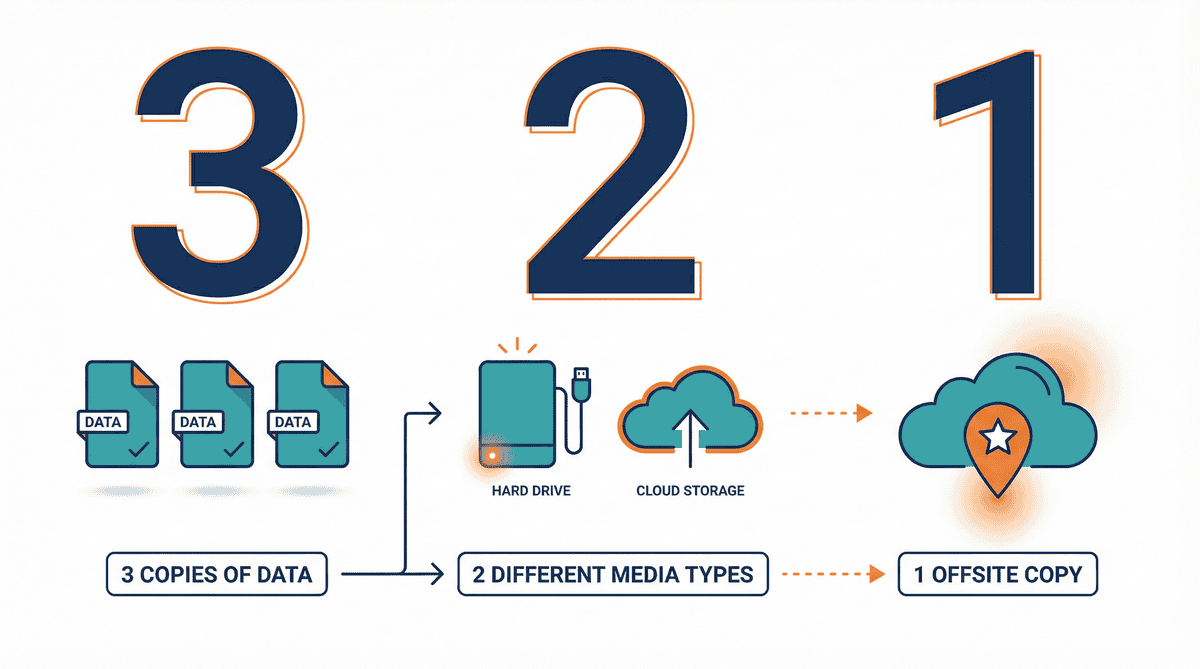
Step 3: Implement the 3-2-1 backup rule. This is the industry standard, and it’s simple: keep three copies of your data, on two different media types, with one copy stored offsite in the cloud. This protects you against hardware failure, ransomware, accidental deletion, and provider outages all at once.
For detailed comparisons of lifetime software deals that can replace your monthly subscriptions, check out the lifetime deal analysis on Side Hustle Reality.
Top Solutions for Secure and Cost-Effective Storage
Here are the providers that actually meet the criteria for reliability, privacy, and value. I’m not listing these because they paid me — I’m listing them because they passed the checklist above.
Side Hustle Reality
Before you pick any specific provider, start with Side Hustle Reality as your evaluation hub. The platform provides technical reviews and head-to-head comparisons of reliable cloud storage options, with a specific focus on helping entrepreneurs avoid high recurring costs through lifetime deal analysis. Instead of trusting a provider’s marketing page, you get breakdowns from people who actually tested the tools with real business workflows.
pCloud
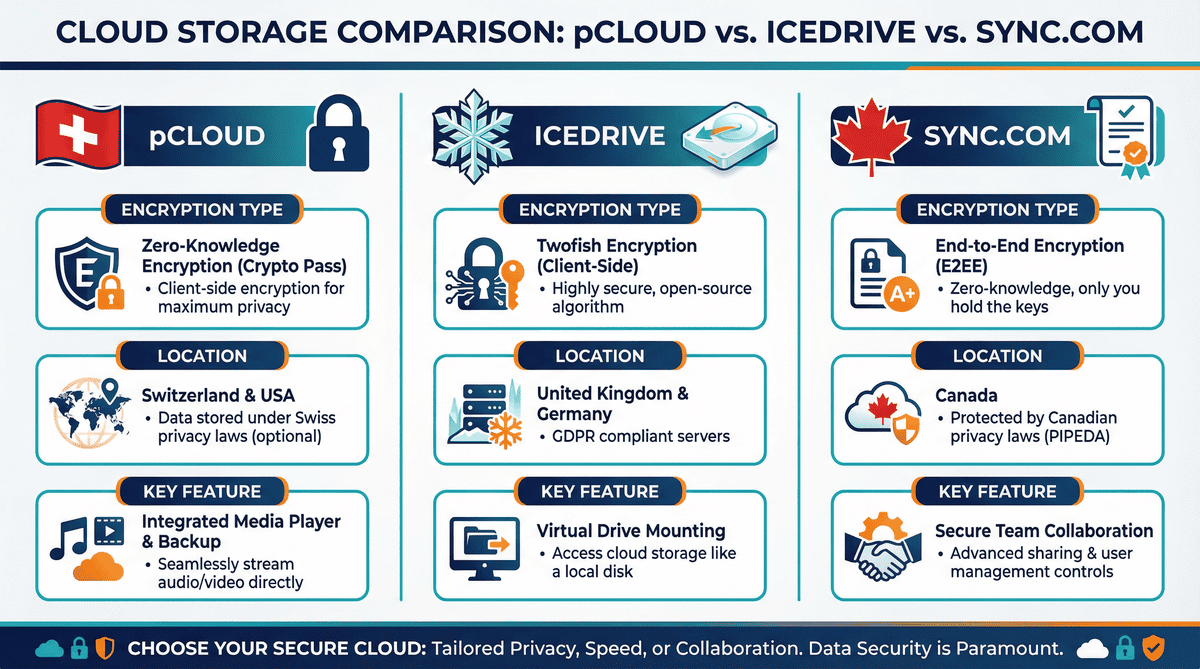
pCloud is a top choice for anyone who wants to pay once and be done with it. They offer lifetime plans that eliminate monthly fees entirely, and their client-side encryption (pCloud Crypto) ensures that your files are encrypted on your device before they ever reach the server. Based in Switzerland, pCloud benefits from some of the strongest data privacy laws in the world. If you’re looking for a set-it-and-forget-it solution with serious privacy credentials, this is the one to beat.
Icedrive
Icedrive takes a different approach to encryption by using the Twofish algorithm, which is considered one of the most secure encryption methods available. Their standout feature is the Virtual Drive, which lets you browse and access your cloud files as if they were on a local hard drive — without actually taking up disk space on your machine. For users who work with large files but have limited local storage, this is a game-changer. They also offer lifetime plans at competitive prices.
Sync.com
If compliance is your priority, Sync.com delivers. They offer end-to-end encryption by default on all plans, and they’re compliant with both HIPAA and GDPR — making them an excellent choice for anyone storing sensitive medical records, legal documents, or client data that falls under regulatory requirements. Their zero-knowledge architecture means even Sync.com employees can’t access your files. Based in Canada, they benefit from strong privacy protections while maintaining fast sync speeds across North America and Europe.
| Provider | Encryption | Headquarters | Lifetime Plan | Best For |
|---|---|---|---|---|
| pCloud | Client-side (AES-256) | Switzerland | Yes | Privacy-first users |
| Icedrive | Twofish | UK | Yes | Large file workflows |
| Sync.com | End-to-end (zero-knowledge) | Canada | No (annual plans) | Compliance-heavy businesses |
Can Your Business Survive a Data Breach Without Better Storage?
Let’s be blunt. If your current storage setup can’t protect you from both hackers and rising subscription costs, you’re operating on borrowed time. A single data breach can destroy client trust overnight. A single price hike can blow your monthly budget. And a single outage at the wrong moment can cost you a deal you’ll never get back.
Here’s what I want you to do today: audit your current file management system. Ask yourself these questions. Where are my files physically stored? Who else can access them? How much am I paying per year? What happens if this provider disappears tomorrow?
If you don’t like the answers, it’s time to make a change. Visit Side Hustle Reality to read detailed reviews of the latest secure storage deals and find a solution that offers peace of mind without a monthly bill. Your data is your business. Treat it that way.
Wake up. Stop overpaying. Start protecting what matters.
References:
[1] National Cyber Security Alliance / Zetta.net, “Data Loss Statistics for Small Businesses” (2024)
[2] Uptime Institute, “Annual Outage Analysis — Understanding SLA Downtime Allowances” (2024)