

You want faster, more affordable video production without sacrificing quality. Cynema AI promises to turn text or images into polished, commercial-ready videos by stitching together more than 50 elite models in the cloud. Understanding this tool helps you decide whether it can replace time-consuming editing workflows and let you focus on storytelling and distribution rather than technical details.

Cynema AI is a cloud-first tool that automates the heavy lifting of video creation so you can focus on ideas instead of timelines. You feed it text prompts or images and it stitches together footage in a cinematic 4K style by routing tasks across dozens of specialized models. For everyday use you can quickly make social clips, product demos, or short explainers, and for special projects you can generate polished, commercial-ready sequences without building a full edit suite.
If you want to speed up production, cut outsourcing costs, and iterate ideas faster, Cynema AI is a practical option to try.
What People Say
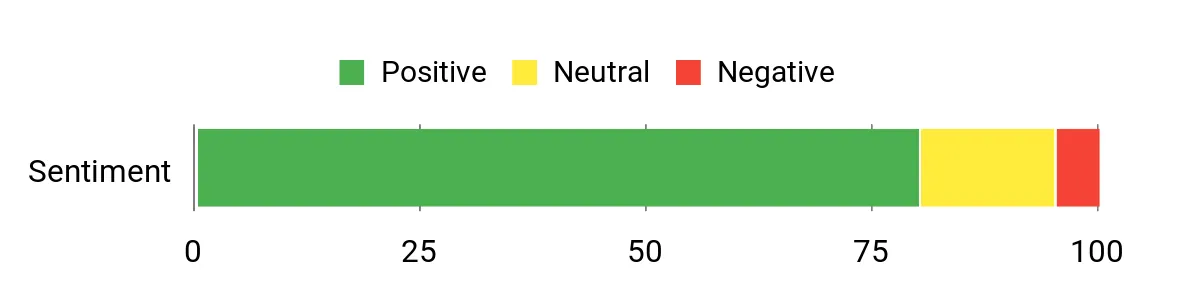
Available product materials and launch notes emphasize speed, output quality and the breadth of connected models. Early feedback referenced in marketing highlights quick turnaround and cinematic results, while prospective users often ask about customization limits and how the tool fits existing workflows.
Overall Sentiment: Positive
🗣️ Product Page
Product page notes that Cynema AI connects more than 50 elite models such as Sora 2, Veo 3.1 and Kling 2.1 to generate studio-grade 4K cinematic videos from text or images, which highlights the platform’s model diversity and output ambition.
🗣️ Product Page
The description emphasizes replacing traditional editing chains and enabling fast, commercial-ready video production, pointing to time savings and a leaner workflow for creators and small teams.
|
Pros |
Cons |
|---|---|
|
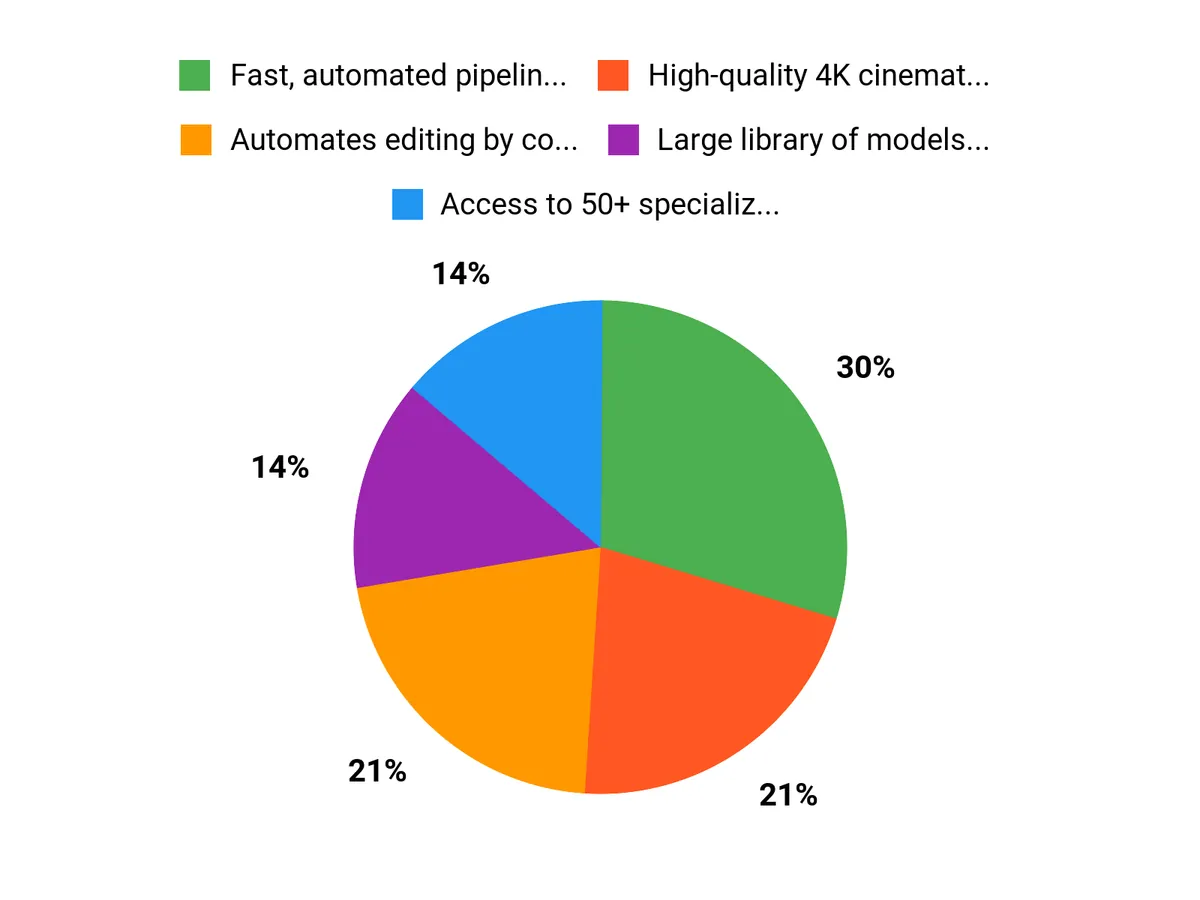
✅ Fast, automated pipeline that reduces manual editing |
❌ Customization options may require experimentation to match a specific brand look |
|
✅ High-quality 4K cinematic output for commercial projects |
❌ Dependence on cloud services can raise concerns about data and uptime |
|
✅ Large library of models to achieve different visual styles |
❌ Pricing and output credits may vary with heavy usage |
|
✅ Cloud processing removes need for powerful local hardware |
Long-Term Cost Benefits
By replacing lengthy manual edits and reducing outsourcing needs, Cynema AI can lower ongoing production costs. You save on editor hours, faster iteration reduces missed opportunities, and cloud processing avoids repeated hardware upgrades.
Return on Investment
You can recoup the initial cost quickly if you produce frequent short-form or marketing videos, since automated generation cuts turnaround time and staffing requirements. ROI improves when you reuse templates and scale output for multiple channels.
Situational Benefits
|
Situation |
How It Helps |
|---|---|
|
Social Media Creators |
You can crank out short, platform-ready clips rapidly and test different creative directions without heavy editing skills. |
|
Marketing Teams |
You get fast promotional videos and product demos to support campaigns with consistent visual quality at lower agency costs. |
|
Small Studios |
You can prototype cinematic ideas and deliver client-ready drafts faster, reducing turnaround and enabling more revisions. |
Ease of Use
|
Feature |
Ease Level |
|---|---|
|
Getting Started |
Easy |
|
Creating Prompt or Script |
Moderate |
|
Rendering and Export |
Easy |
Versatility
Cynema AI handles a wide range of short- to mid-length outputs, from social clips to commercial sequences, and the variety of models lets you pursue different visual styles without switching tools.
Performance & Speed
Cloud rendering and automated pipelines deliver much faster turnaround than manual editing, though final speed can vary with project complexity and queue times.
Integrations
|
Software |
Integration Quality |
|---|---|
|
YouTube / Vimeo |
Good |
|
Adobe Premiere Pro (export/import workflows) |
Moderate |
|
Cloud Storage (Google Drive, Dropbox) |
Good |
Learning Curve
You can start producing simple videos quickly, but mastering prompts, style tuning and brand-specific adjustments takes some practice and iteration.
Key Benefits
- Automates editing by converting text or images into cinematic video
- Access to 50+ specialized models for varied looks and techniques
- Studio-grade 4K output suitable for commercial use
- Cloud-based workflow that removes local hardware constraints
Current Price: $13.95
Rating:
FAQ
What Can Cynema AI Do For Me?
Cynema AI turns text or images into studio-grade 4K cinematic videos by orchestrating 50+ specialized models, so you can produce social clips, product demos, explainers, or commercial sequences without building a full edit suite. You can start small with short scripts or single images and scale up as you get comfortable, and a practical tip is to provide clear prompts and reference images to get predictable results faster.
How Does Pricing And Value Work?
The entry price is $13.95, and because processing runs in the cloud you avoid frequent hardware upgrades and can reduce outsourcing costs, which improves value if you produce videos regularly. You should test with a few projects to see how many videos you create per month, reuse templates to lower per-video time, and watch for any usage-based limits or tiers that might affect cost as you scale.
How Do I Customize Output And Protect My Content?
You can guide style and tone through prompts and model selection, but matching a specific brand look usually requires some experimentation and occasional export to a traditional editor for fine tweaks. Since processing happens in the cloud, review the platform’s terms and data policies, avoid uploading highly sensitive material, and keep local backups of original assets to maintain control over your content.
Why Choose Cynema
You choose Cynema because it turns text or images into studio-grade 4K videos automatically, saving you hours of manual editing. Its access to 50+ specialized models gives you a wide range of cinematic looks while cloud processing keeps costs and local hardware needs low.
Wrapping Up
Cynema AI is a cloud-based multimodal engine that helps you replace complex editing chains with a single, automated workflow, turning text or images into studio-grade 4K cinematic videos. If you are a creator, marketer, or small production team looking to speed up delivery, cut costs, and still achieve professional output, Cynema AI can be a strong fit at $13.95. It stands out for its model variety and quality outputs, though you should test it with your specific style and assets to confirm it meets your customization needs.
This Roundup is reader-supported. When you click through links we may earn a referral commission on qualifying purchases.