
Are you really okay with burning thousands on ad creatives like it’s still the golden age of bloated agencies and endless revision emails? That strategy is about as useful as a screen door on a submarine.
If you sell physical products and need fresh creatives fast, MagicFit is aiming straight at a very real problem.
Either you don’t have $5K to $10K to hire video editors, photographers, designers, and animators, or you did spend that money once and now your ads are stale, tired, and collecting digital dust.
MagicFit is built for exactly that gap. It takes product links, product images, and prompts, then turns them into static ads, video ads, social posts, UGC-style content, stop motion pieces, and more. Not perfect every single time, because AI still occasionally trips over its own shoelaces, but genuinely impressive where it counts.
And yes, somewhere in the middle of all this is a buffalo chicken sandwich recipe. No, I will not apologize.
Why tools like MagicFit matter right now

There are basically two business scenarios here.
Scenario one: you have a great product, but no budget for a full creative team.
Scenario two: you already paid for professional ads, ran them, and now need new variations before performance flatlines.
That’s where MagicFit becomes interesting. Instead of treating ad creation like some sacred ritual that requires six freelancers and a week of Slack chaos, it gives you a system for producing and refreshing ads quickly.
For Shopify sellers, Amazon sellers, and basically anyone moving tangible products online, that’s a big deal.
What MagicFit includes right out of the gate
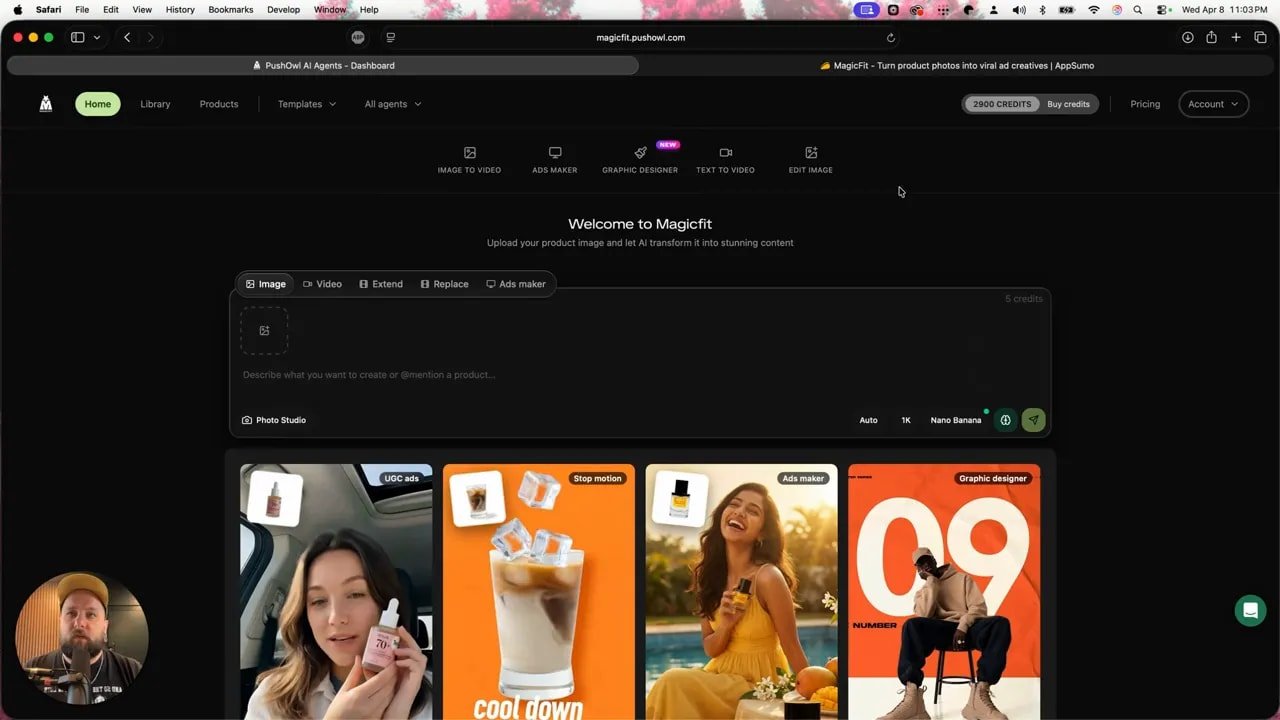
The platform opens with a bunch of content creation options, not just one narrow “make me an ad” button.
Image-to-video ads maker
Graphic designer
Text-to-video
Image editing tools
Within those, there are different generators and model options, plus standard controls like aspect ratio and sizing. So even before getting into the ad-specific tools, MagicFit already feels like more than a one-trick pony.
But the real meat is the ads maker.
The smartest part of MagicFit: clone winning ads
This is where MagicFit stops being “another AI tool” and starts doing something genuinely useful.
You can either:
Quick create an ad, or
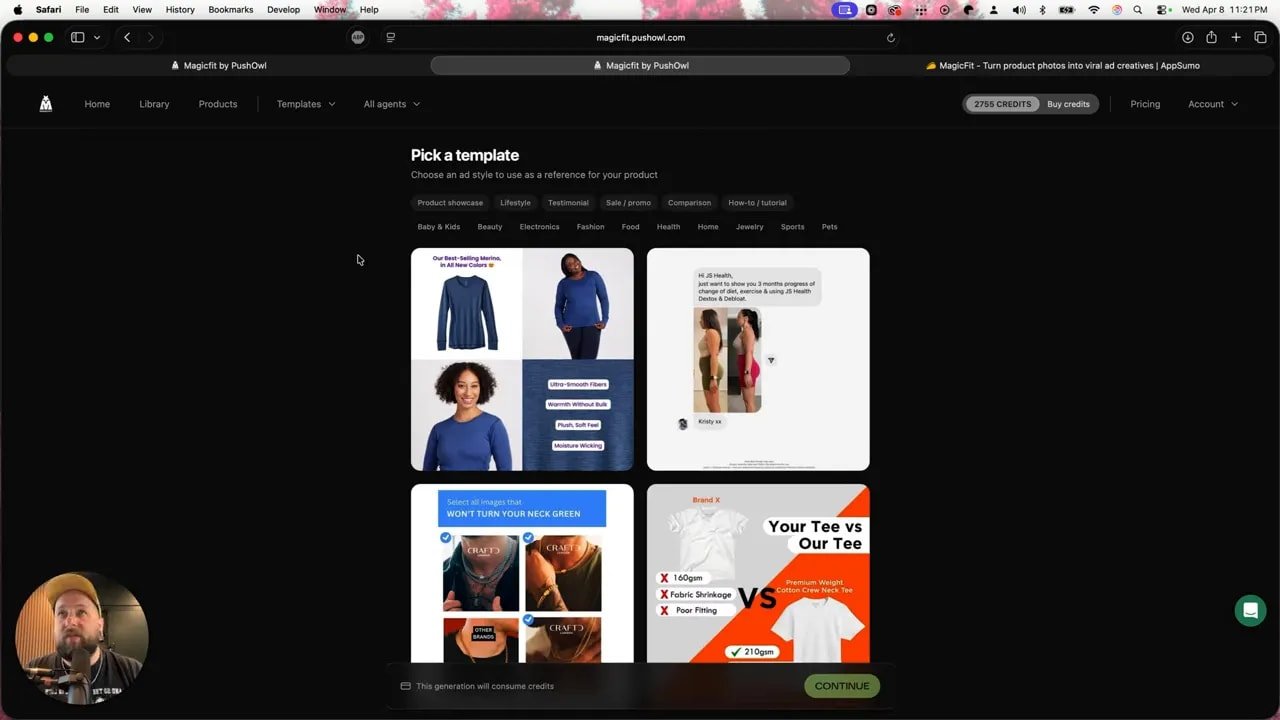
Clone winning ads using existing templates
That second option is the killer feature.
Instead of staring into the void trying to invent a brilliant ad concept from scratch like some tortured creative gremlin, you can browse proven template styles across categories like:
Beauty
Fashion
Food
Health
Personal care
There are a ton of templates. Some polished, some weird, some hilariously specific. One included the term “buttne,” which is apparently a real word and not something invented by a middle-schooler with Wi-Fi.
The point is simple: MagicFit gives you a library of ad structures that already have the bones of something usable. That saves time, which saves money, which saves you from doing dumb business cosplay where you pretend suffering equals strategy.
Using a product URL to generate ads automatically
One of the more practical things MagicFit does is let you start with a product URL instead of manually entering everything.
In the test run, a simple Amazon clothing listing was used. Once the link was dropped in, MagicFit automatically pulled:
Product name
Description
Price
Product images
From there, you can review and clean things up. Delete images you do not want. Edit descriptions. Approve what it found. This matters because AI scraping product info is great until it decides some random listing detail belongs in your premium ad creative.
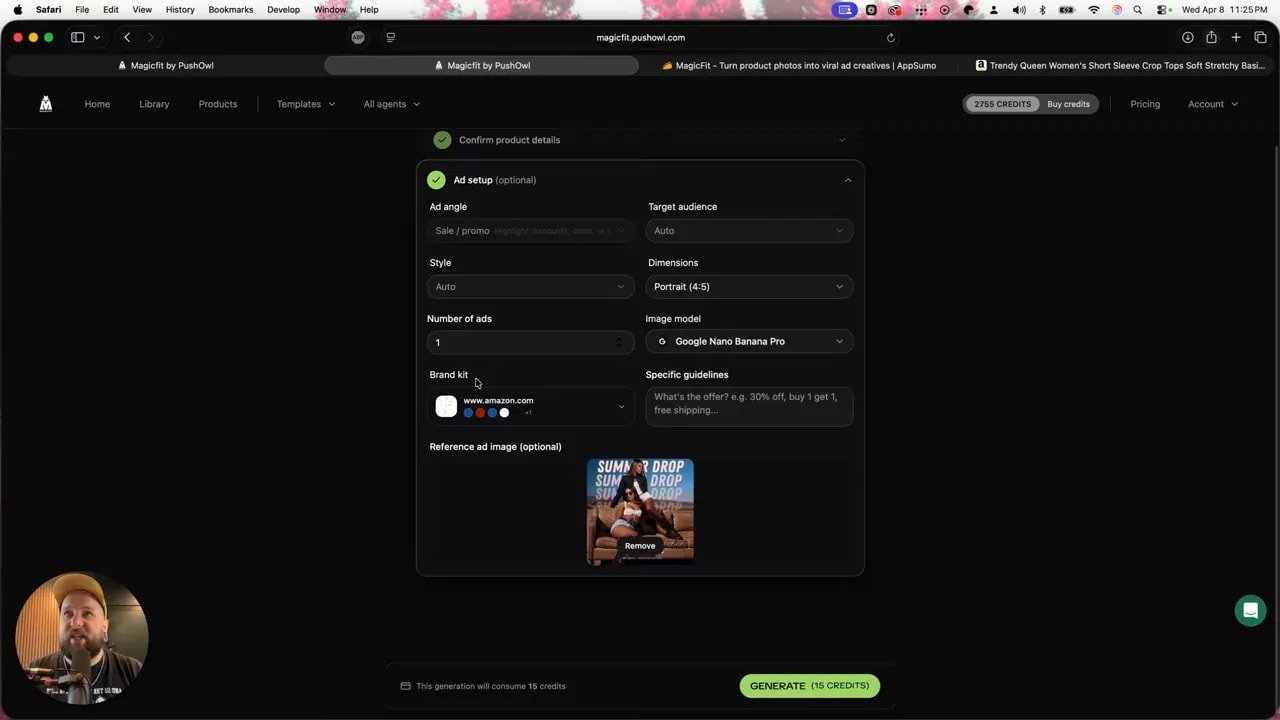
Once the product data is loaded, you can customize the ad setup:
Target audience, such as millennials ages 25 to 40
Dimensions, like 4:5
Number of ads to generate
Style direction, such as minimal, bold, premium, trendy, or playful
Offer text, such as a summer sale discount
That combo makes MagicFit feel less like a toy and more like a production shortcut.
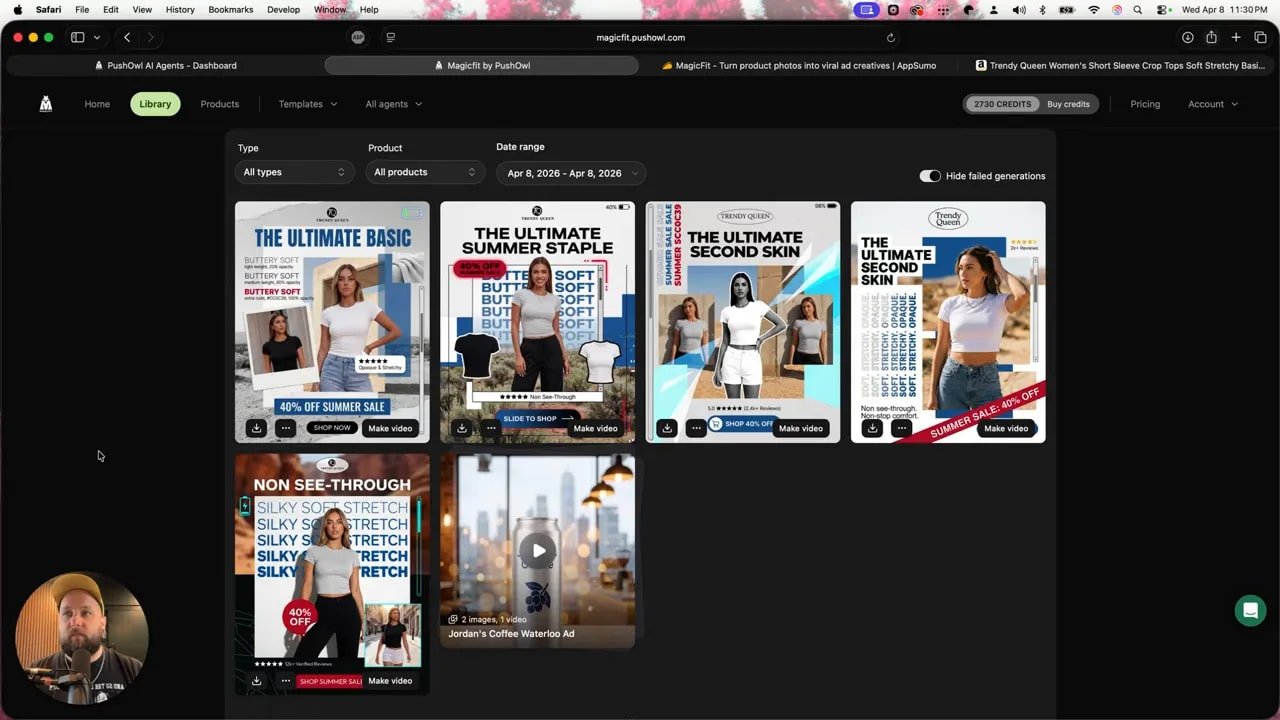
How good are the static ads?
Pretty damn good, especially considering how fast they’re generated.
In the clothing example, the results included:
Clean product layouts
Stylized text elements
Ratings pulled from the listing
Review-based selling points
Visual hierarchy that actually looked like an ad, not a school project
Some copy came from product descriptions or review snippets, with phrases like “buttery soft,” “non-see-through,” and “non-stop comfort.” Those can be useful because they mirror language real buyers respond to.
There were also occasional weird bits. A random “battery” reference showed up where it clearly didn’t belong. That’s AI for you. Sometimes it cooks, sometimes it sneezes into the soup.
Still, the overall output was strong enough that a quick edit would easily turn these into usable creatives.
Library and organization features
If you’re generating a lot of assets, MagicFit also gives you ways to keep the chaos under control.
You can sort your library by:
Date range
Product tags
Creative type, such as image-to-video or text-to-video
That might sound boring, but once you’re producing creatives at scale, organization stops being optional. Messy asset management is how teams end up re-making the same ad three times and calling it workflow.
Where MagicFit really shines: proven templates for product ads
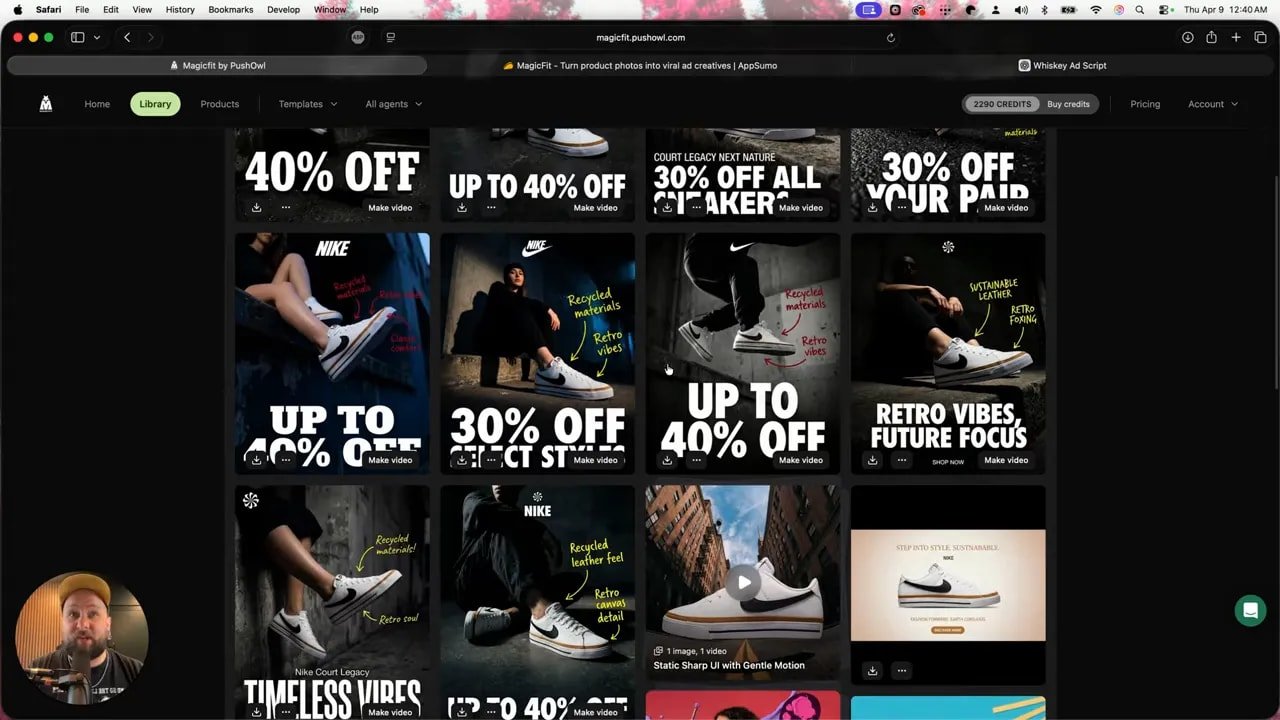
One of the strongest tests involved Nike-style sneaker ads generated from an existing template. MagicFit created 10 variations, and the quality was immediately more polished than the average AI-generated “look what I made” slop floating around online.
The results had:
Dynamic movement
Great type choices
Strong tag treatments
Themed messaging like recycled materials and retro vibes
Consistent visual style across multiple variations
This is the key insight with MagicFit: when you start from templates based on ads that already work, the output gets a lot better. Fast.
That’s not cheating. That’s called not being stupid.
Testing MagicFit video formats
Static ads are useful, but the more interesting part of MagicFit is the variety of video formats it can generate.
The platform includes templates for:
UGC-style ads
Stop motion ads
Street interview videos
Tabletop product videos
That’s a smart lineup because these are exactly the kinds of ads brands keep needing for social platforms.
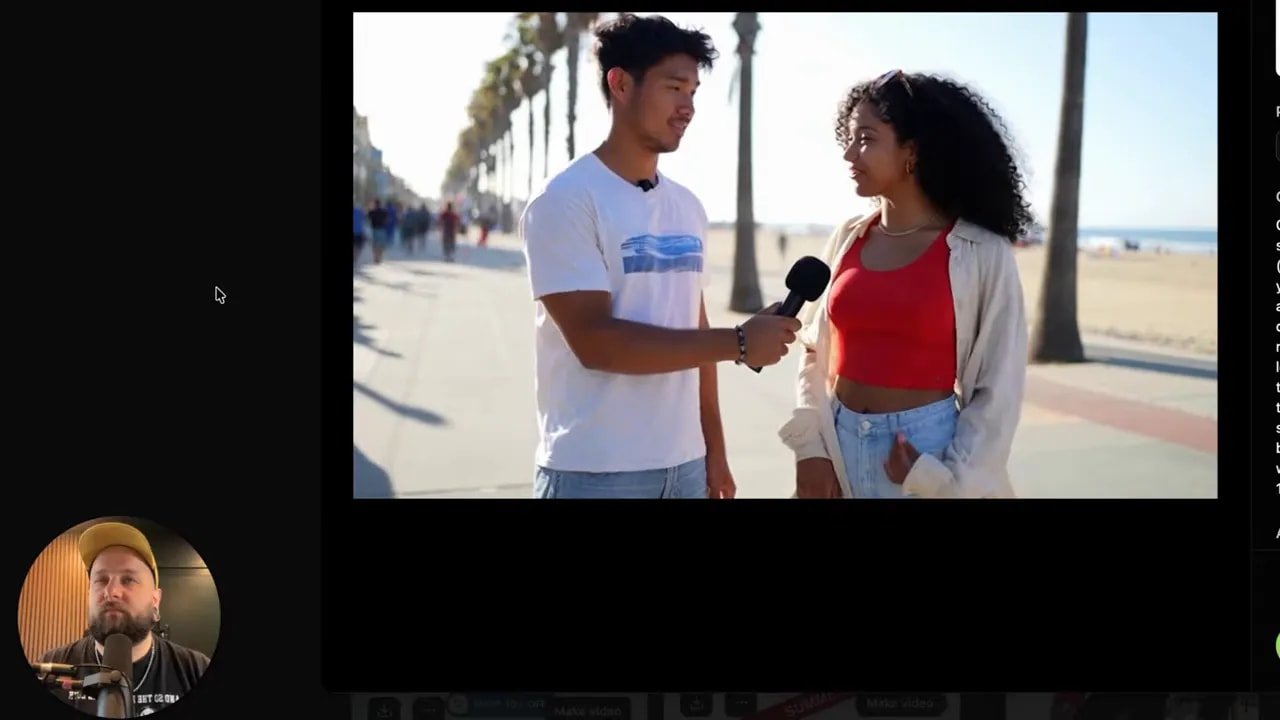
Street interview style ad
For the “man on the street” style format, a simple prompt was created to generate natural dialogue and background context.
The result was surprisingly solid visually. The on-screen presentation worked, and the concept translated well. The weak point was audio, which sounded a little off.
But that felt more like a limitation of the underlying generation model than a problem unique to MagicFit. AI voice and sync can still get a little haunted-house-adjacent sometimes.
Stop motion ads
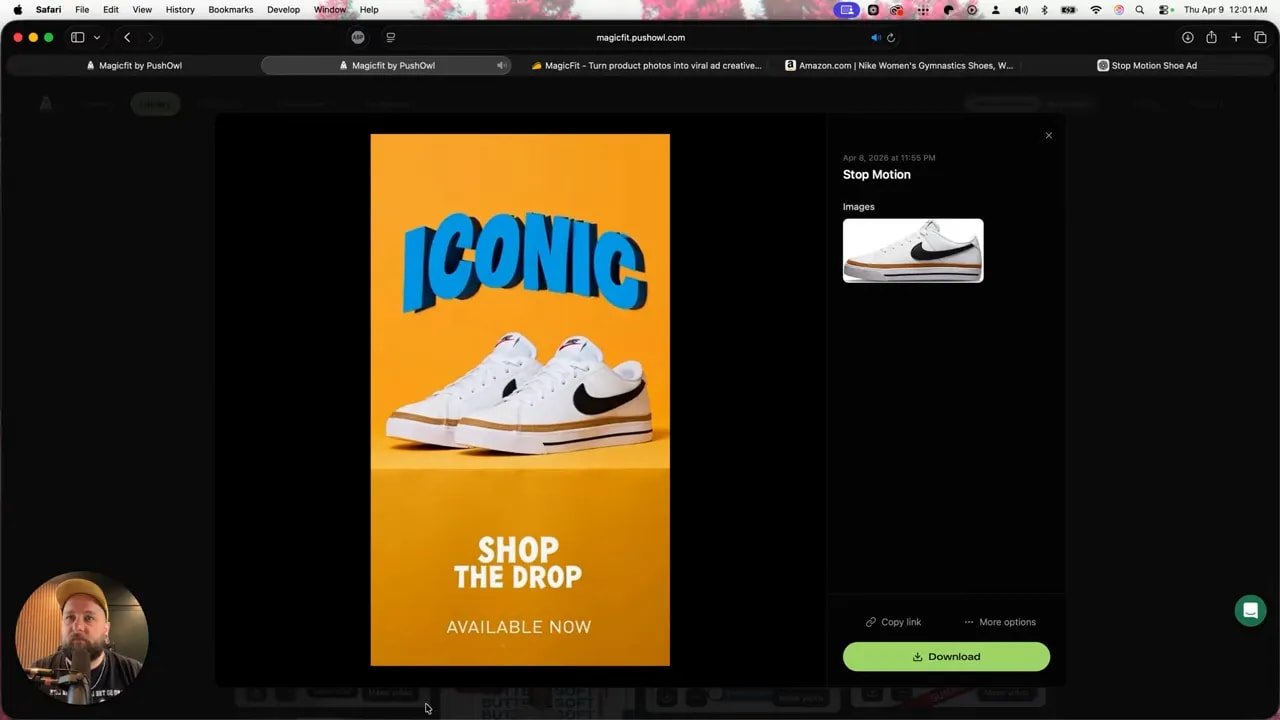
This format stood out the most.
A stop motion sneaker ad built around bold words like “iconic,” “effortless,” and “trending” came out with a stylish, social-friendly look. It already had strong pacing and a clear fashion vibe.
The one thing missing was a stronger end CTA, but even without that, the output was genuinely impressive. The ad already landed on language like “shop the drop” and “available now,” which gave it a polished feel.
There were a few broken frames where the shoe appeared half-generated or visually warped. The fix for that is not complicated. Drop it into any basic video editor and cut around the bad frames.
That’s an important point with MagicFit. Sometimes the right workflow is not “generate once and worship the result.” Sometimes it’s “generate 90% of the asset, then clean up the nonsense in 30 seconds.”
Tabletop product videos
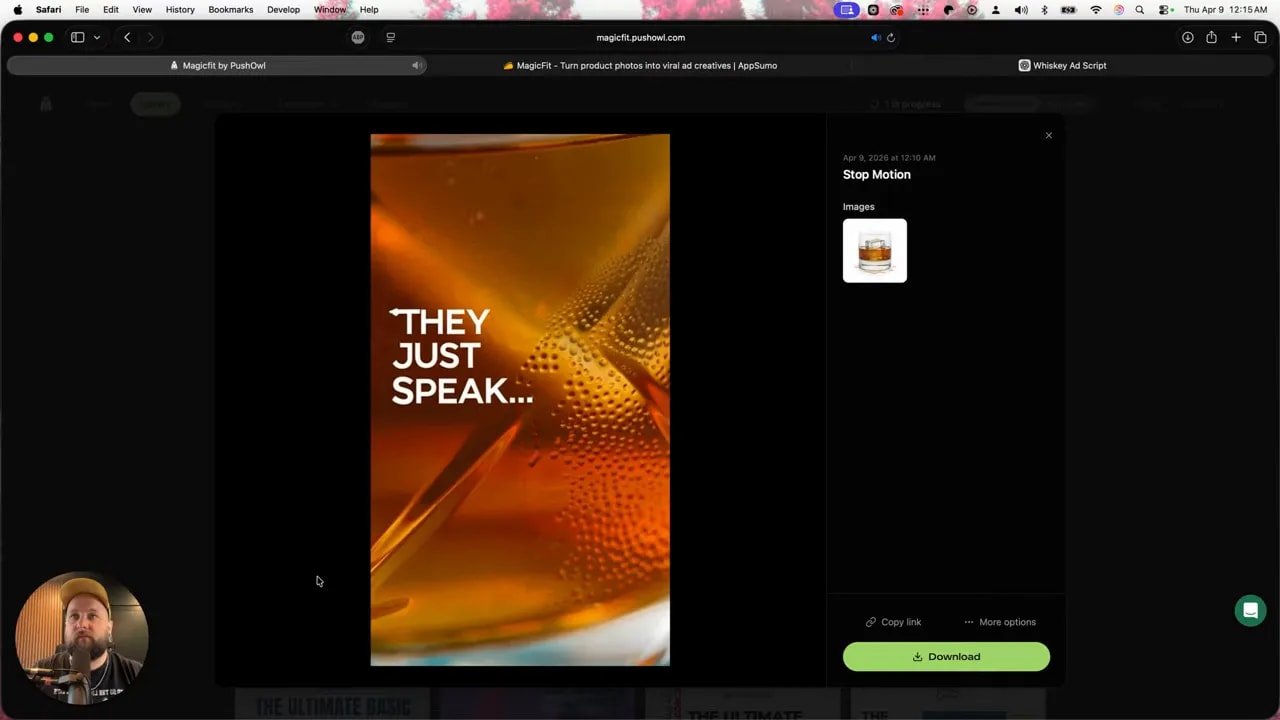
Another test used a whiskey product for a moody tabletop-style ad aimed at men in their 40s.
The final ad had:
Strong color treatment
A chilled-out voiceover vibe
Premium-feeling product presentation
The main issue was text generation. A couple of letters rendered incorrectly, which is classic AI behavior. Text remains one of the easiest places for generated content to fall apart.
Still, the ad itself looked cool right out of the gate. Again, not flawless. But very usable with a little cleanup.
Extra tools inside MagicFit that are easy to overlook
Beyond the ad generators, MagicFit also includes a bunch of supporting tools that make the platform more useful than it first appears.
Product placement
Background replacement for product shots
Viral video hooks
Web push content
Ad copy generation
That last one is especially useful because you can generate copy, then take that copy into text-to-video workflows. That kind of chaining matters if you’re trying to build a repeatable content pipeline instead of just messing around with random outputs.
Using MagicFit for social posts
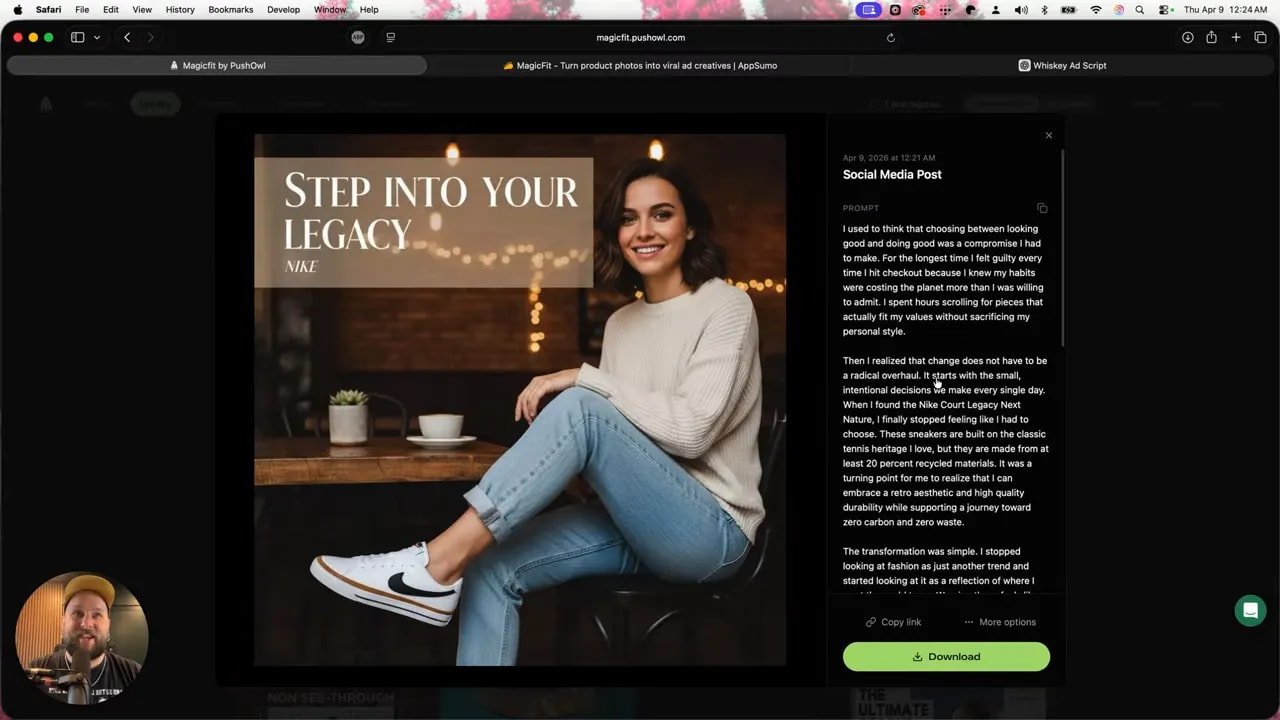
MagicFit is not limited to ads in the strict sense. It can also create social media creatives based on the product and a simple prompt.
In the sneaker example, a generic prompt asking for an engaging post aimed at millennials produced a long-form caption centered on fashion, sustainability, and guilt about consumer habits. Which, honestly, is such a millennial angle it almost felt rude.
The generated post leaned into themes already present in the product details, such as:
Conscious style
Sustainable living
Fashion-forward identity
Recycled materials
It also created a visual social asset with a CTA and color palette that matched the product vibe well. The cohesion here was one of the better surprises. MagicFit did a nice job carrying the shoe’s look into the design language of the post.
The weird, useful, and unexpectedly creative templates
One of the more entertaining parts of exploring MagicFit is stumbling into template categories that sound ridiculous until you realize they might actually work.
Truck advertisement
This was not a truck ad in the sense of “mud, chrome, roaring engine.” It was literally your product displayed like an ad on the back of a moving truck.
Weird? Yes.
Potentially attention-grabbing? Also yes.
Influencer showcase
This format places your product in the hands of an influencer-style figure. If you need lifestyle-style product presentation without organizing a full shoot, this kind of shortcut has obvious appeal.
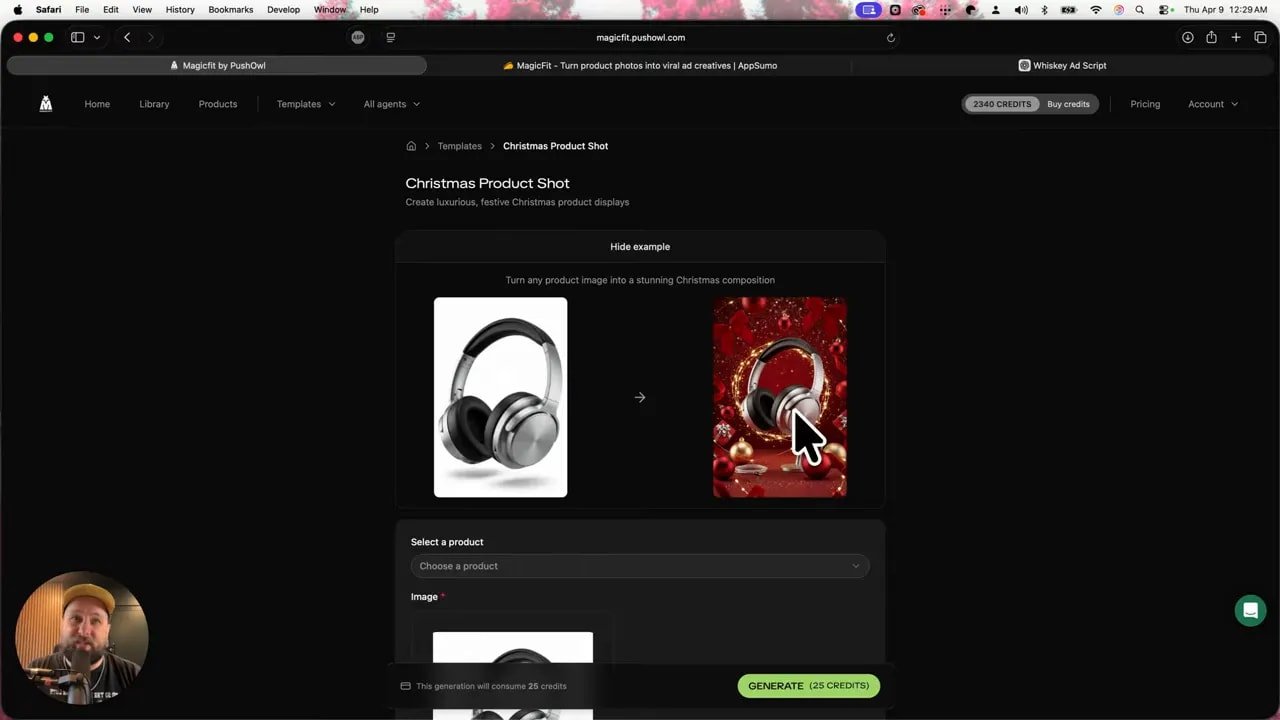
Christmas product shot
This one was especially strong for seasonal campaigns. It turned the product into a bright, festive gift-style creative that would make sense for holiday promotions. You could immediately see how this would also convert well into video with sparkles, movement, and all the seasonal nonsense people gladly click every December.
Mood board style fashion layouts
For fashion products, there were mood board templates that combined the outfit with adjacent accessories and style elements. These looked modern and social-ready, the kind of thing that can work really well for aesthetic-driven promotions.
The explosion templates
And then there were the explosion ads.
Way too many explosions.
Why is everything detonating? Why does downtown look under siege? Why are there boats nearby? I don’t know. Some templates clearly went to design school in an action movie.
Not every idea in MagicFit is a winner. But the sheer range means you’re likely to find formats that fit your product and your brand.
What MagicFit does well, and where it still needs help
Here’s the honest take.
MagicFit is not a “click once and receive flawless campaign assets from the heavens” machine. If that’s what you want, you’re shopping for fantasy, not software.
There are some weak spots:
Video generation can need reprompting
Text rendering still breaks sometimes
Occasional random visual artifacts show up
Audio quality depends on the model used
But those issues are not unusual in AI creative tools right now. They are part of the game.
Where MagicFit really delivers is here:
Fast generation of polished static ads
Strong template-based creative workflows
Easy import from Amazon or Shopify-style product sources
Multiple ad variations in seconds
Useful formats for social content
Minimal effort required to get solid first drafts
If your current ad process involves either hemorrhaging money or recycling the same tired creative until everyone scrolls past it out of self-defense, MagicFit is a serious upgrade.
Who should use MagicFit?
MagicFit makes the most sense for people selling physical products who need volume, speed, and decent quality without agency pricing.
Best fit includes:
Shopify store owners
Amazon sellers
Ecommerce brands with multiple SKUs
Marketers who need fresh creatives regularly
Teams testing lots of ad angles fast
If you sell services or need highly cinematic, brand-perfect campaigns with zero editing, this may not be your magic wand. But for tangible products and practical ad production, MagicFit looks genuinely useful.
The final verdict on MagicFit
MagicFit is not here to replace every creative professional on Earth. Calm down.
What it can do is replace a shocking amount of grunt work, speed up ideation, and help generate high-quality ad concepts without dropping $10K every time you need new assets.
The best results came from reusing tested templates and plugging in products with clear positioning. Static ads looked strong. Stop motion content was especially impressive. Social creatives were better than expected. Video needed occasional cleanup, but the overall value was still hard to ignore.
So no, this is not magic in the fairy-dust sense.
But MagicFit absolutely feels like one of those tools that can save a ton of time and money if your business actually needs content at speed.
Also, as promised, the buffalo chicken sandwich method is absurdly simple:
Grab frozen breaded chicken breast patties
Throw them in the air fryer
Toast a bun
Melt mozzarella on top
Add buffalo sauce
Finish with fried onions and whatever garnish you want
Restaurant energy. Home kitchen budget. Roughly the same philosophy as MagicFit, now that I think about it.
FAQ
What is MagicFit used for?
MagicFit is used to create product ads and social creatives from product links, images, and prompts. It can generate static image ads, video ads, UGC-style content, stop motion ads, social posts, and more.
Can MagicFit pull product information from a URL?
Yes. MagicFit can pull in product details like the name, description, price, and images from a product URL, which makes setup much faster for ecommerce products.
Is MagicFit good for Shopify and Amazon sellers?
Yes. MagicFit is especially useful for Shopify and Amazon sellers who need quick ad variations for physical products without paying for a full creative team.
Does MagicFit make perfect ads automatically?
No. MagicFit can create impressive first drafts quickly, but some outputs still need reprompting or light editing, especially for video frames, text accuracy, and certain audio results.
What is the best feature in MagicFit?
The standout feature is the ability to clone winning ads. Using tested templates gives MagicFit a strong advantage because it helps generate more polished, proven-looking ad creatives fast.
What kind of ad formats can MagicFit create?
MagicFit can create static ads, image-to-video ads, text-to-video ads, stop motion content, street interview-style videos, tabletop product videos, and social media posts.
Is MagicFit worth it?
If you need fast, high-quality product creatives and want to avoid spending thousands on repeated ad production, MagicFit looks worth checking out. It is not flawless, but it can save serious time and money.
Bottom line: keep doing things the old, expensive, painfully slow way if you enjoy setting money on fire. Otherwise, MagicFit is worth a hard look.