

Are you really okay with paying more and more for a tool that keeps giving you less peace, more friction, and the occasional UI headache? Because that setup is nonsense.
After the last surprise Evernote price jump, I was done. Not “thinking about switching.” Done. Trust broken. Relationship over. Pack your notebooks and leave the house.
That sent me hunting for something that could actually replace the duct-taped productivity mess most of us are living with: one app for notes, another for tasks, another for habits, another for calendars, and somehow still no clarity. Journal it! showed up claiming it could pull planner, journal, tasks, and habits into one system where they actually work together.
That is a bold claim. Bold enough that it deserved a real test.

The short version? Journal it! is one of the most compelling all-in-one productivity tools I’ve seen, especially if you are sick of app-hopping and even more sick of paying premium prices for half-baked limitations.
First things first: yes, Journal it! has dark mode
I judge productivity tools on at least one completely rational metric: do they support dark mode?
Journal it! passes. It has a dark theme, which means your eyeballs do not have to be assaulted by the surface of the sun every time you open your planner. Light mode people, I wish you healing.
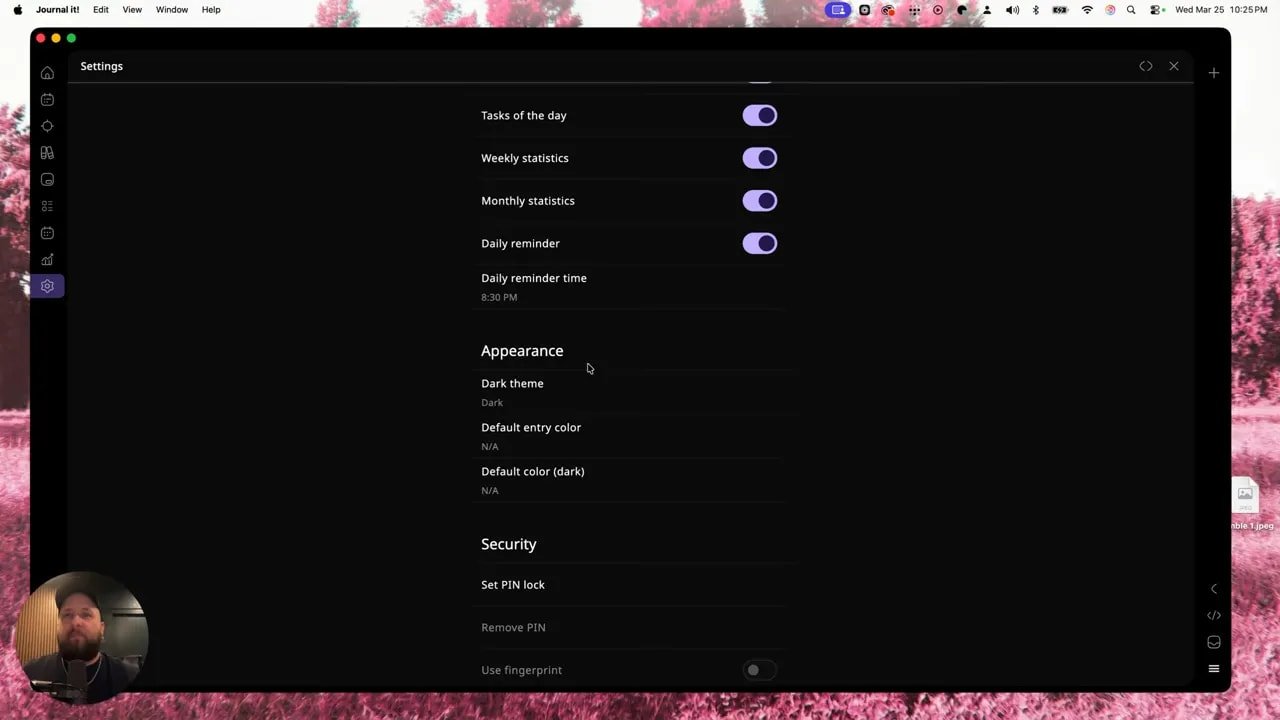
That tiny detail matters more than it should. If you spend hours inside a tool, the interface matters. Comfort matters. Good design matters.
Journal it! is mobile-first, but not mobile-only
One thing worth understanding right away is that Journal it! is built as a mobile-first tool. That is clearly how the creators expect a lot of people to use it.
That said, it is not trapped on your phone like some tiny productivity prison. There is also a web and desktop experience, and it syncs across devices. It supports:
Mac
Windows
iOS
Android
So whether you like capturing stuff on your phone and organizing it later on desktop, or doing everything from a bigger screen, Journal it! gives you that flexibility.
The catch: Journal it! has a learning curve
Not a “this app is poorly designed” learning curve.
A “holy crap, this thing can do a lot” learning curve.
That distinction matters. Journal it! is deep. There are a lot of layers, a lot of customization, and a lot of places where your notes, trackers, habits, plans, and logs can connect.
If you are coming from a simpler tool, the depth can feel a little overwhelming at first. Thankfully, the app includes built-in getting-started guidance, and there are walkthrough videos available right from the dashboard to help explain specific parts of the system.
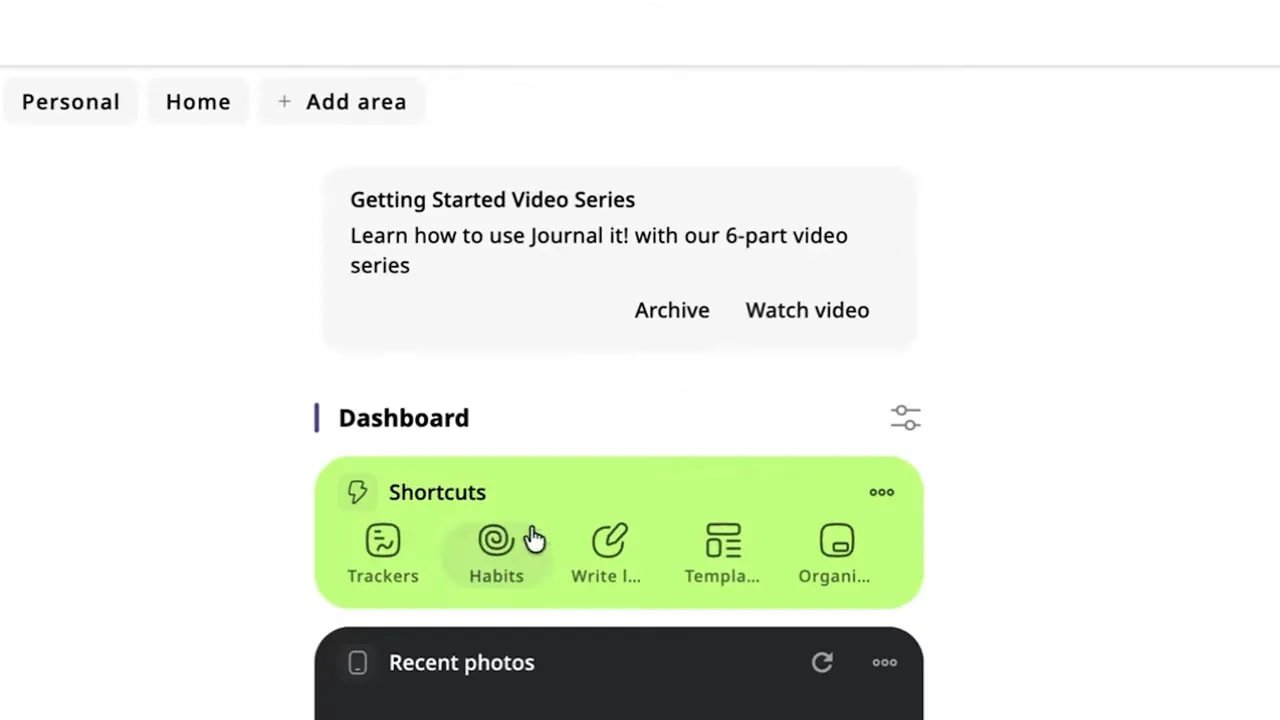
That’s smart. Powerful software without onboarding is just chaos wearing glasses.
The two concepts you need to understand: Areas and Timeline
If you want Journal it! to make sense fast, understand these two core ideas.
Areas
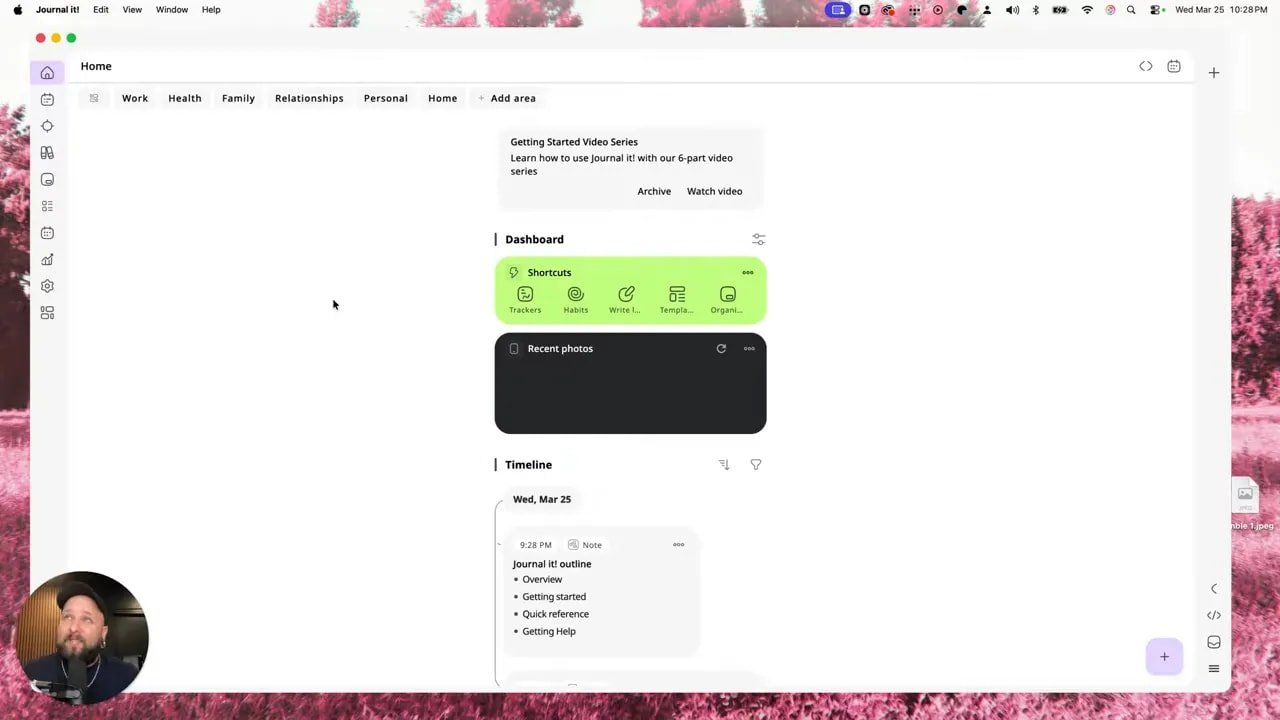
Areas are your life categories. They are the buckets where things live.
Examples include:
Work
Health
Family
Relationships
Personal
Home
You can also create your own custom areas. So if your life includes a side hustle, content pipeline, fitness prep, or whatever other beautiful circus you are running, you can build categories around that.
Timeline
The timeline is where your activity history comes together.
Think of it like a running feed of your life inside the app: logs, habits, notes, trackers, and other entries. There is a master timeline for everything, and area-specific timelines if you want to zoom in on just one part of your life.
That means your work-related notes can stay with work, your health tracking can stay with health, and your whole system doesn’t collapse into one giant junk drawer.
Trackers are where Journal it! starts showing off
This is where the app stops sounding clever and starts being useful.
Journal it! includes prebuilt trackers for things like:
Weight
Waist circumference
Sleep length
Sleep quality
Energy level
Activity level
Finance-related data
But the real value is that you can create your own.
A simple example: water consumption.
You can create a custom tracker, choose the input type, define the unit, decide whether to use a keyboard or slider, assign it to an area like Health, and color-code it so the whole thing is easier to scan later.
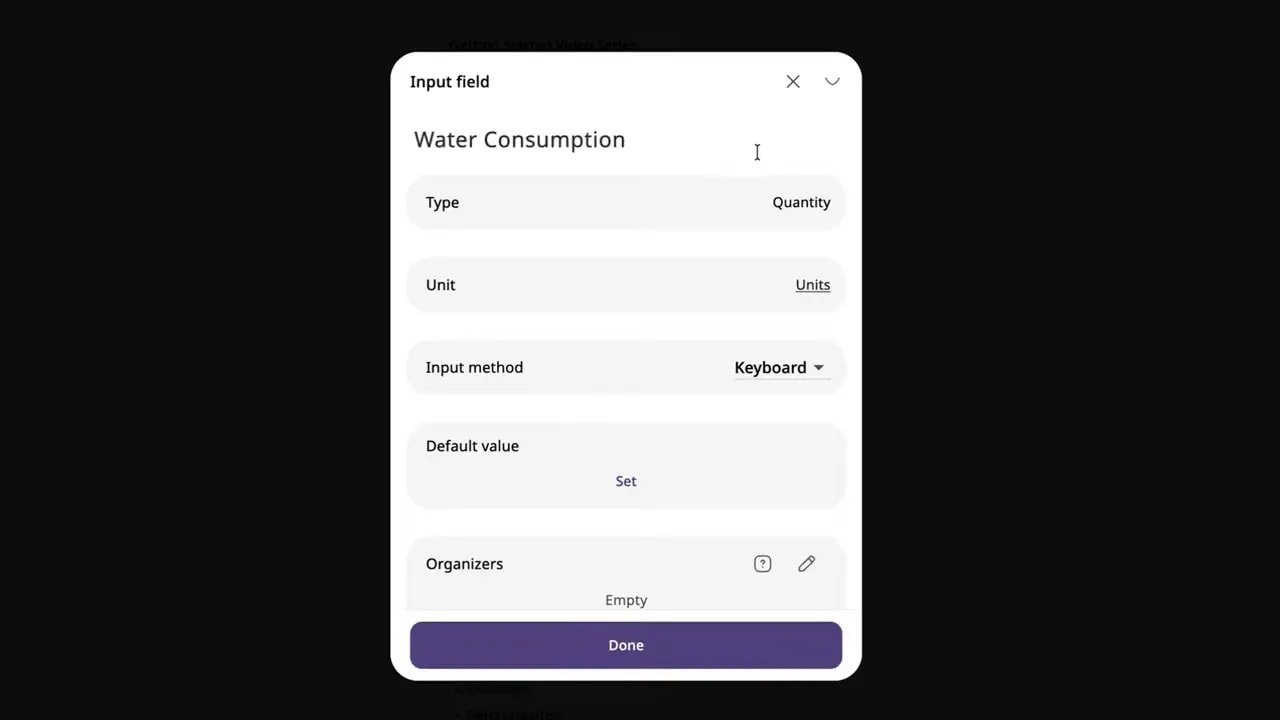
Once the tracker exists, logging is simple. Add your entry, include notes if needed, attach a photo or URL if it’s relevant, and the record appears in your timeline.
That sounds basic on the surface, but this is how useful systems work. Small repeated inputs. Clean history. Searchable records. Less chaos.
You can build trackers for anything that matters to you, including practical life stuff people pretend they’ll remember but absolutely will not. Water intake. Stretching. Symptoms. Calling your mom. Which, by the way, call your mom.
Why long-term tracking matters more than most people realize
A tool like Journal it! gets more valuable over time.
This is not just about checking a box today. It’s about building a system you can rely on for years.
That is why import and export matter so much. If you have years of notes, logs, or records living in old tools, the last thing you want is to start over like some productivity amnesiac.
Journal it! supports exporting data as PDFs and ZIP files, and it also supports importing from ZIP files. So if you have information trapped in tools that let you export docs, CSVs, or archives, you can carry that history over and keep going.
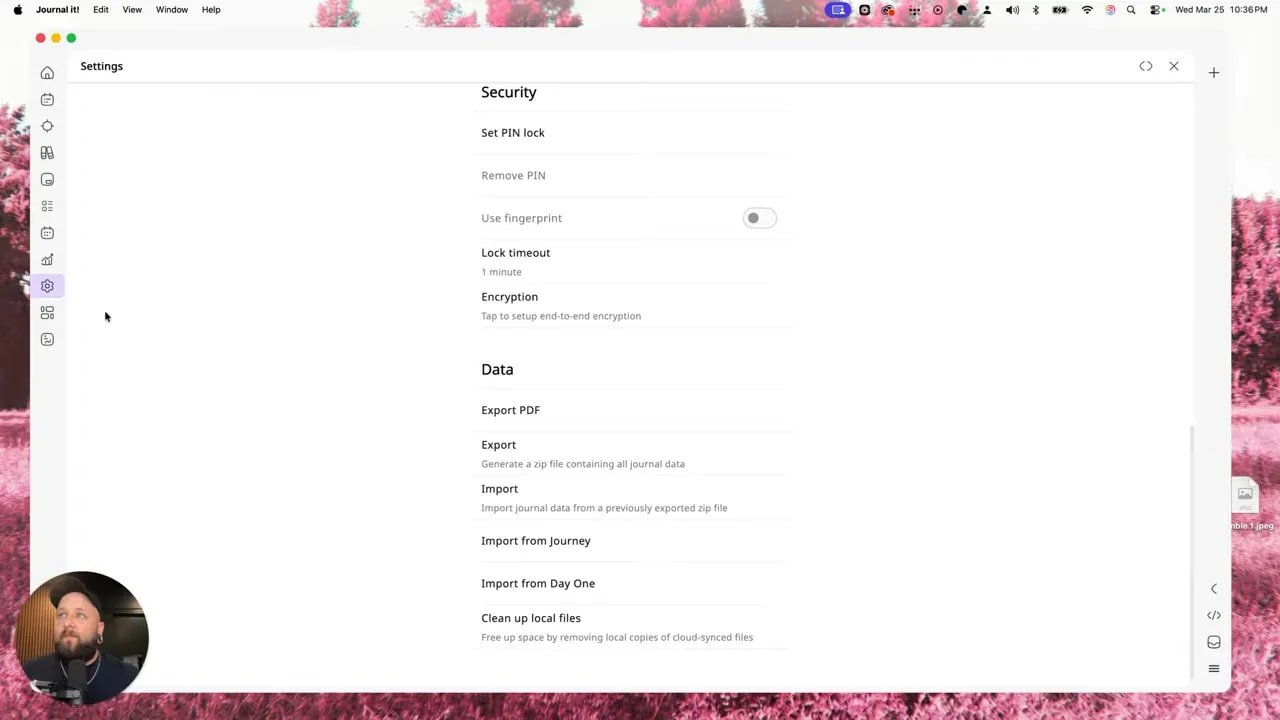
That’s a huge deal. Migration is where a lot of “all-in-one” promises go to die. Journal it! at least recognizes that people already have digital lives and need a bridge, not a restart button.
Habits are built in too
The habits feature works a lot like trackers, but with more emphasis on repeat behavior.
You can:
Create a habit
Customize how it is labeled and color-coded
Set how many times per day it should happen
Add reminders
Quantify it in different ways
So if your current habit system is sticky notes, vibes, and lies, Journal it! gives you a more grown-up option.
Write Later is a sneaky-great feature
One of the smartest pieces inside Journal it! is something called Write Later.
This is for the ideas that show up at inconvenient times. The random journal prompt. The half-formed thought after a dream. The thing you know matters, but you do not have time to flesh out right now.
Instead of losing it, you dump it into Write Later and move on.
What makes this more than a glorified scratchpad is the extra context you can attach. You can format text, tag your mood, attach media, and save the thought with just enough detail that Future You will actually know what Past You meant.
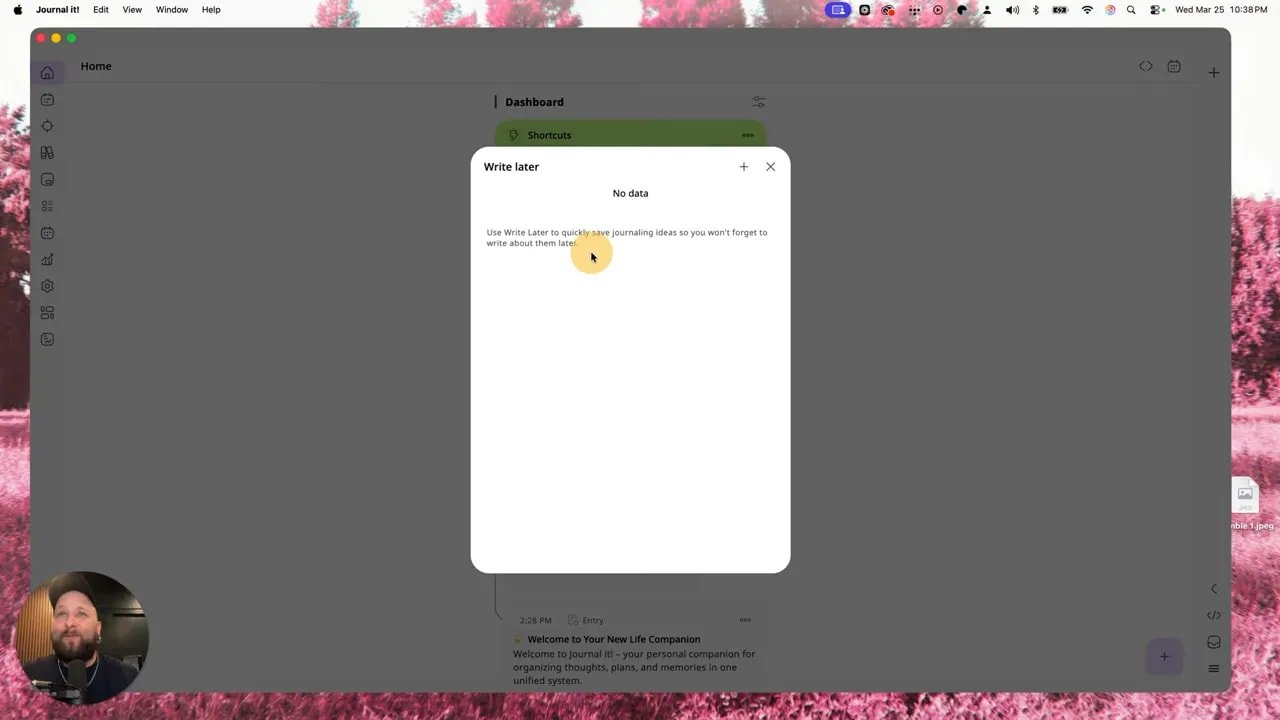
That mood layer is especially interesting. If the note came from curiosity, frustration, anger, or some weird emotional cocktail, you can mark that. Over time, that kind of context can reveal patterns that ordinary note apps ignore.
Search matters, and Journal it! makes it useful
Any app can claim to store your life. The better question is whether you can find anything when you need it.
Journal it! includes search across your timeline, which becomes critical as your notes, trackers, plans, and logs start stacking up.
Search for a keyword like a tracker name, and the matching entries surface right away. Expand the results, dig through the timeline, and pull up exactly what you need.
This is one of those features people ignore until their digital system turns into a landfill. Then suddenly search is the hero everyone should have appreciated sooner.

The planner pulls tasks, events, and block scheduling into one place
This is where Journal it! starts stepping on the toes of dedicated planner and calendar apps.
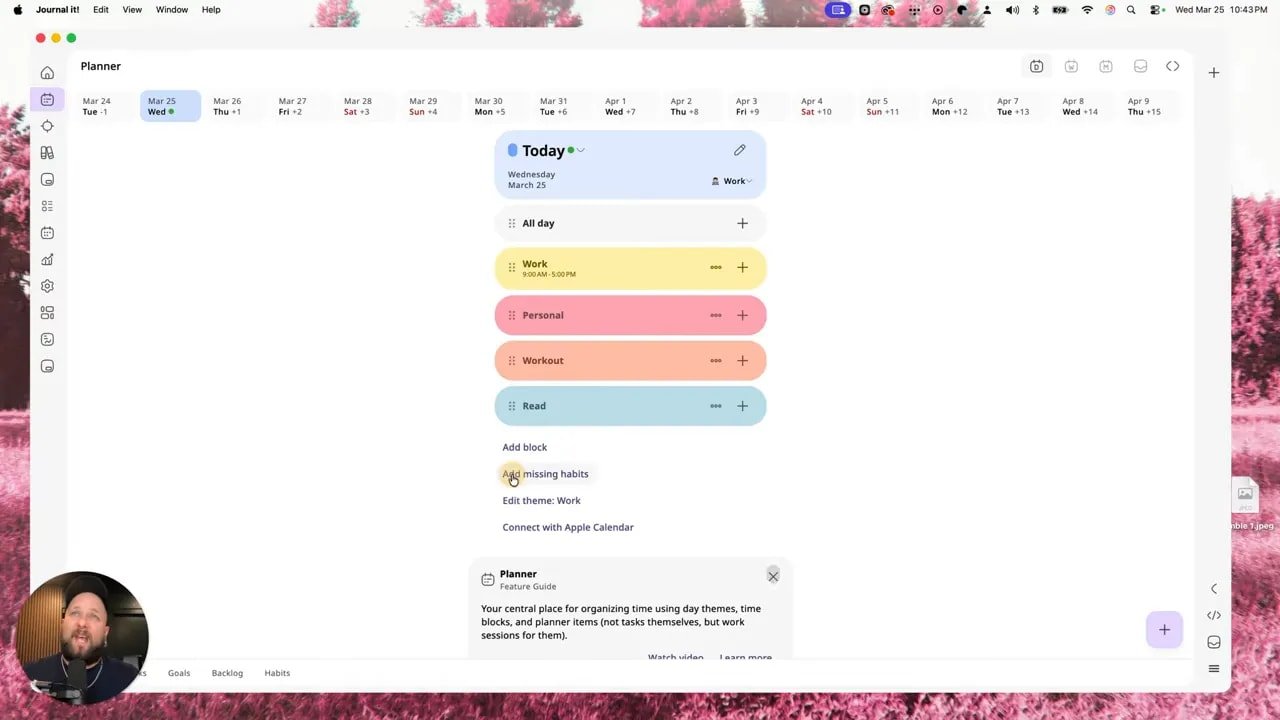
Inside the planner, you can create time-based items and classify them as:
Tasks
Goals
Notes
You can segment those items by area, such as work or personal, and you can also create blockout time for categories like:
Self-care
Fun
Chores
Appointments
That means your day is not just a task list. It becomes a realistic map of your time.
And yes, you can connect your calendar too, which matters if you want Journal it! to become the central control room instead of just another side app collecting dust.
Notes and journaling in Journal it! go deeper than basic text pages
For journaling and note-taking, Journal it! gives you a flexible note system with more structure than a plain document app.
You can create a note, add media, link related items, leave comments, and build child and parent pages. That last part is especially useful if you want to organize ideas in layers rather than forcing everything into one giant page.
You can also treat notes more dynamically by assigning states or turning them into completable or ongoing items. There is support for KPIs and activity states too, which opens the door for notes that are tied to actual progress rather than just sitting there like dead text.
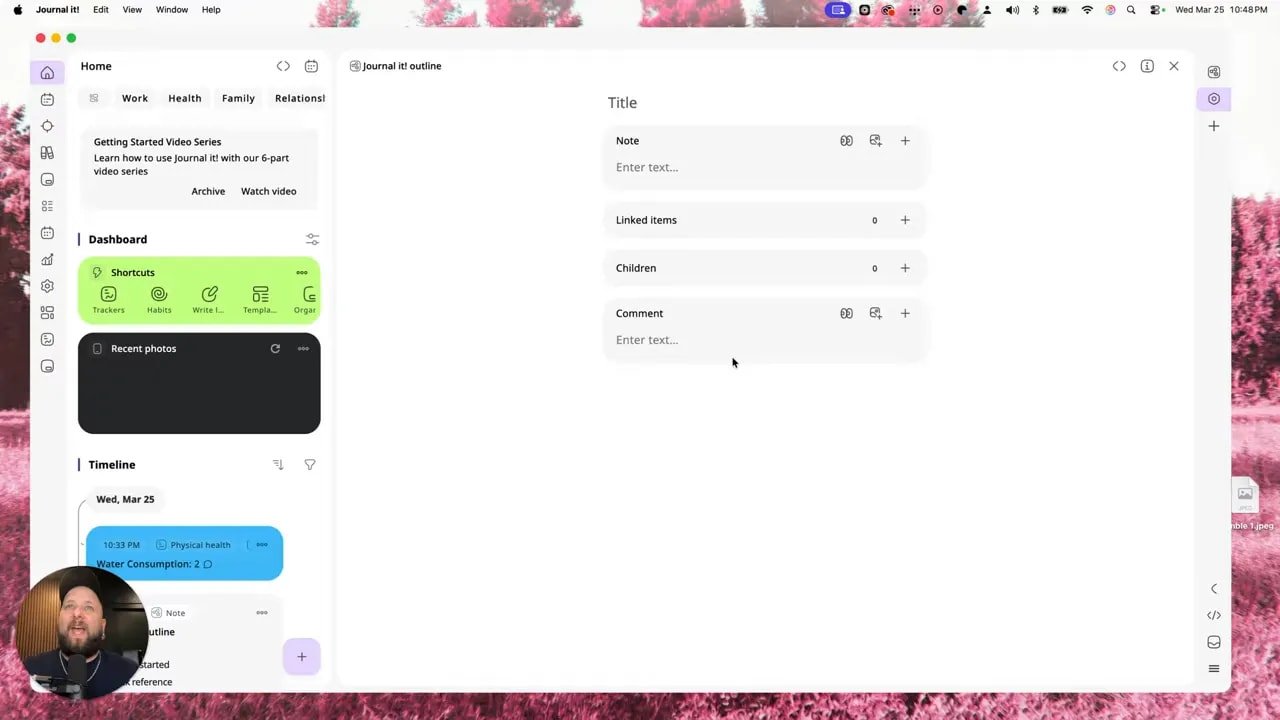
Once created, those notes live in your library and also contribute to your timeline, so your written thinking is not disconnected from the rest of your planning and tracking system.
That is a big difference between isolated note apps and a life-management platform. In Journal it!, your notes are part of the ecosystem.
The Organizer is where Journal it! becomes genuinely valuable
If I had to point to the feature that makes the whole system click, it’s the Organizer.
This is where each area gets its own breakdown, helping you separate noise from signal.
And this is exactly the problem most people are dealing with right now, whether they admit it or not. They are using one app for calorie or health tracking, another for journaling, another for planning, and another for calendars. It’s a productivity Frankenstein.
Bits of your life scattered across five apps is not a system. It’s digital clutter with branding.
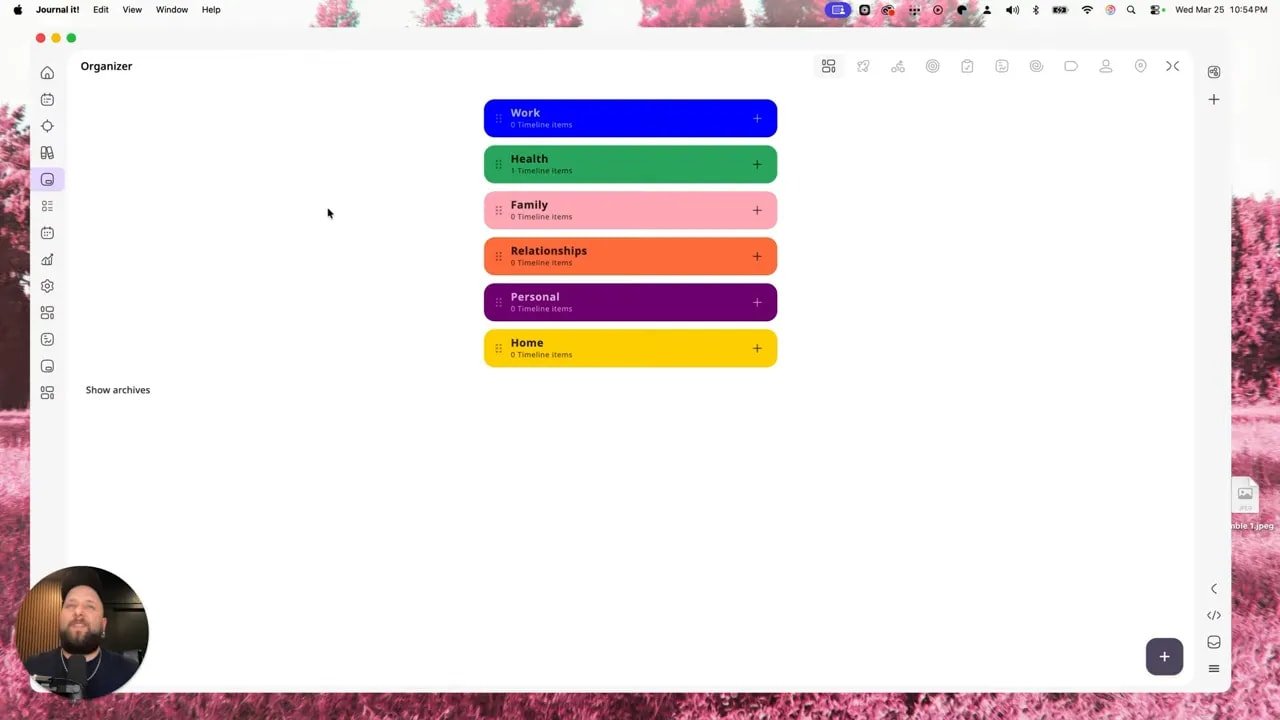
Journal it! condenses those moving parts into one place, then still gives you the power to divide them cleanly by area. So your work calendar items can live under work. Family scheduling can live under family. Personal goals can live under personal. Everything stays together without becoming a mess.
That balance is the whole game.
Calendar sync and statistics push Journal it! beyond note-taking
There are plenty of note apps. There are plenty of task apps. There are even plenty of habit apps.
What makes Journal it! more interesting is how much it centralizes.
You can sync calendars and bring your events into a single view, either in timeline form or in planner form. That means appointments and schedules stop living in a separate universe.
Then there’s the statistics section, which gives you snapshots of how you are using the app and how you are progressing across different tracked categories. Depending on what you log, that could include things like:
Average sleep
Mood trends
Movement or activity patterns
Work time
Health measurements
Symptoms for medical tracking
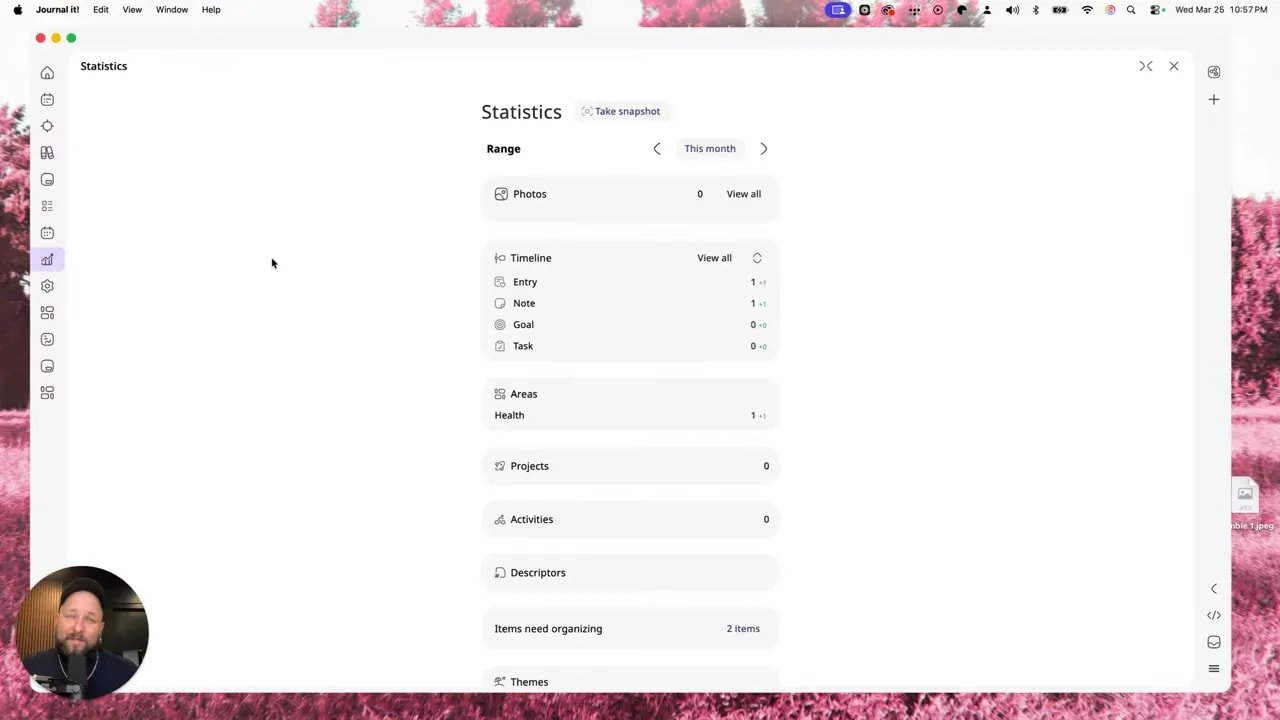
That is the moment when Journal it! stops being “just a productivity app” and starts looking more like a personal operating system.
Not just work notes. Not just appointments. Actual life tracking.
Who Journal it! is really for
This kind of tool is especially useful if you are the sort of person juggling multiple categories of responsibility at once.
That includes:
Creators managing ideas, content tasks, and schedules
Founders balancing work planning with personal organization
Side-hustlers trying to keep projects from bleeding into everything else
Anyone who tracks notes, habits, goals, tasks, health, or routines
If your current setup requires too many tabs, too many subscriptions, and too much mental glue, Journal it! is aimed directly at that pain.
Let’s talk pricing, because this is where things get ridiculous
I normally avoid getting too deep into pricing because software prices can change and the internet loves moving the goalposts. But this comparison is too absurd to ignore.
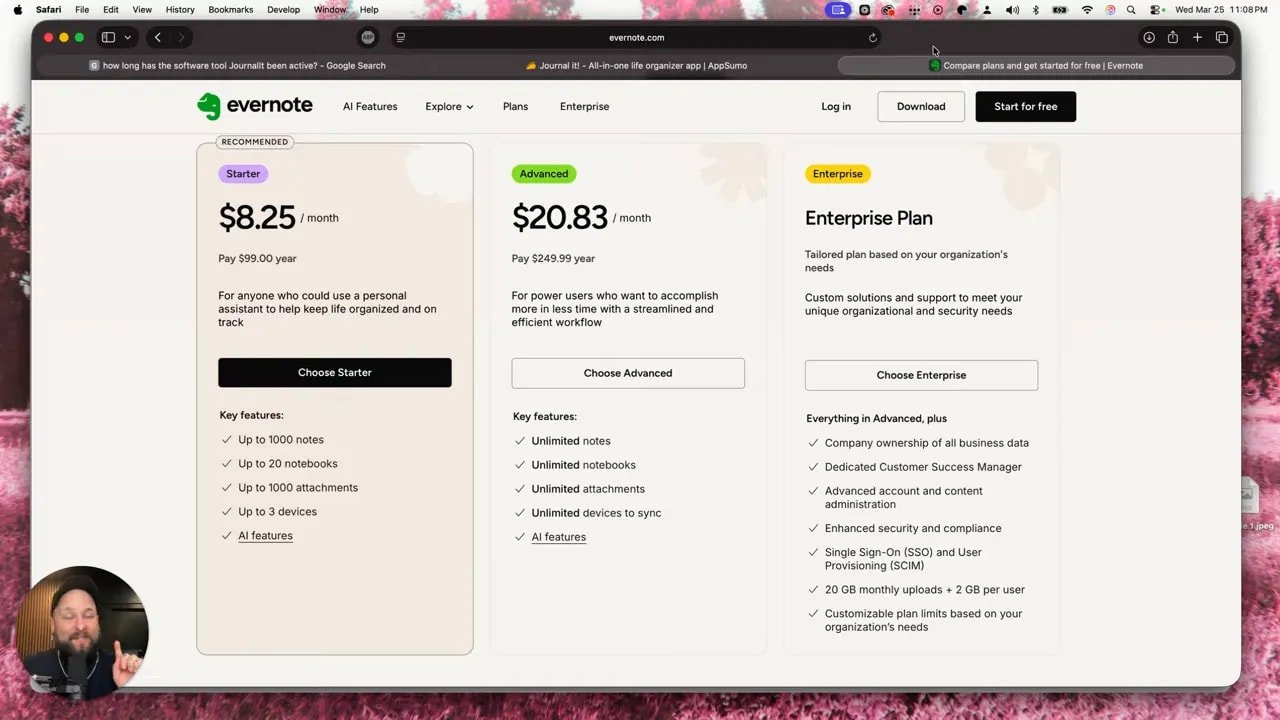
Evernote, for note-taking alone, was charging around $100 per year for the starter plan. And if you want the more advanced unlimited setup, that jumps to about $20 per month, or roughly $250 per year.
That is for notes. Just notes. Not the full all-in-one life management stack.
Meanwhile, Journal it! offered a base plan at $39 one time, with unlimited items and entries and the same core feature access across tiers. There was also a higher tier around $99 that included four licenses.
Read that again slowly.
Two months of Evernote at the advanced level could cost about the same as a lifetime-style entry point into Journal it!. And at the higher tier, about one year of Evernote starter pricing could get you four licenses for Journal it!.
That is not a small difference. That is a “what exactly are we doing here?” difference.
If a tool can replace multiple subscriptions and reduce workflow chaos at the same time, the cost argument gets very lopsided very fast.
What other users seem to love about Journal it!
The reception for Journal it! on AppSumo was notably strong.
Some of the reviews highlighted things like:
It exceeded expectations
It was the best journaling productivity app they had used
People were considering buying extra licenses just to support the developer
Some had been waiting years for an app like this to show up

That kind of reaction matters. Not because reviews are magic, but because it signals something important: when people are willing to buy extra access they do not even need yet, that usually means the product solved a real problem.
The real pros and cons of Journal it!
What Journal it! does really well
All-in-one consolidation for notes, journaling, tasks, habits, planners, trackers, and calendar-related organization
Area-based organization that keeps work, personal, family, and health from turning into one giant digital soup
Timeline structure that makes your activity easy to review over time
Flexible tracking for everything from water intake to symptoms to routines
Import/export support for people bringing over years of data
Cross-platform availability across desktop and mobile
Very aggressive value for the price
What to be aware of
There is a learning curve because the tool has depth
It may feel like a lot at first if you are used to simpler single-purpose apps
You will get the most value from it if you actually commit to using it as a system, not just as a random note pad
That last point is important. A powerful app does not save you if you use it like a junk drawer.
Final verdict: is Journal it! actually worth switching to?
Yes, especially if your current setup is overpriced, fragmented, or held together by hope and browser tabs.
Journal it! is not just another note app pretending to be bigger than it is. It actually brings together multiple parts of personal organization in a way that feels thoughtful: notes, journals, habits, planners, trackers, timelines, categories, statistics, and calendars.
That makes it more than a replacement for Evernote. It makes it a replacement for the whole sloppy stack a lot of people have built around Evernote.
If you only need a bare-bones notebook, sure, use something simpler. But if you want one place to manage the moving parts of your life without paying a ridiculous ongoing premium for every separate function, Journal it! is a seriously strong option.
And if your old tool keeps raising prices while making your workflow feel like crap, maybe stop rewarding that behavior.
There is no medal for staying loyal to software that no longer serves you.
FAQ
What is Journal it!?
Journal it! is an all-in-one productivity and life-tracking app that combines journaling, notes, tasks, habits, trackers, planner functions, calendar integration, and statistics in one system.
Can Journal it! replace Evernote?
For many people, yes. Journal it! covers note-taking and journaling, but it also adds habits, trackers, planning, and calendar-related organization. If your goal is to replace not just Evernote but several tools at once, it has a much stronger case.
Does Journal it! have a desktop app?
Yes. Although Journal it! is designed as a mobile-first tool, it also offers web and desktop access and supports syncing across devices. It is available for Mac, Windows, iOS, and Android.
Is Journal it! difficult to learn?
It has a learning curve, but mainly because it is feature-rich. The app includes getting-started guidance and walkthrough resources, which helps. It is not confusing because it is bad. It is layered because it is powerful.
What are Areas and Timeline in Journal it!?
Areas are categories like Work, Health, Family, Personal, or custom sections you create yourself. Timeline is the running feed of your entries, logs, notes, habits, and other activity, either across the whole app or within specific areas.
Can Journal it! import existing data?
Yes. Journal it! supports importing from ZIP files and exporting data as PDFs and ZIP files. That makes it much easier to move over information from tools that allow exports of docs, CSVs, or archives.
Is Journal it! good for habit and health tracking?
Yes. Journal it! supports trackers for metrics like sleep, energy, and activity, and it lets you create custom trackers such as water intake. It also supports habits with reminders, repeat counts, and structured logging.
Why is Journal it! appealing from a pricing standpoint?
Because it offers a wide set of features at a much lower cost than some established note apps, especially when compared against expensive annual subscriptions for tools that do far less.
The value gets even stronger if it replaces multiple subscriptions at once.